Edit or delete a LinkedIn comment? Which to pick
Typo? Edit it. Wrong fact? Delete and repost. Someone replied? Add a correction. What LinkedIn confirms, what it costs, and how to avoid needing to.

Part of our LinkedIn comments guide: where to comment, what to write, and how to measure what it earns.
You can edit a LinkedIn comment after you post it. LinkedIn shows "(edited)" above it. You can also delete it, but deleting removes every like and reply on that comment.
So the choice is simple. Edit a small slip. Delete and repost a wrong fact. Reply to correct a comment people have already answered. Here is how to decide, step by step.
Can you edit a LinkedIn comment after posting it?
Yes. LinkedIn Help says you can edit comments on posts or articles in your homepage feed or in the Activity section of your profile. It adds that you will see "(edited)" above the comment.
That is all LinkedIn says. It does not say how long you have, whether the author is told, or whether edits change how your comment is ranked. Anything beyond that is a guess, so treat other claims with care.
A founder in Austin and a consultant in Manchester will see the same thing: your corrected text, with a small label above it.
Does the "(edited)" label hurt you with a buyer?
Probably very little. Our reading is that a clean comment with a small label looks better than a comment with a visible error in the second line. Buyers judge the point you make, not the label.
One vendor, Well Met, goes further. It says the label is permanent and that the post author's notification keeps your old text. LinkedIn does not confirm either claim on its help page, so take them as one vendor's view. The safe habit is simple: assume the person you want to impress may have seen the first version.
What happens to likes and replies if you delete a comment?
They go too. LinkedIn Help says that when you delete a comment, "all likes and replies on it are removed". That includes replies from the post's author.
So delete only when the comment is fresh and nobody has answered it. If a buyer replied to you, a deletion also deletes their words from your thread. That can look like you ran away from the conversation.
When should you edit, and when delete and repost?
Use one question at a time.
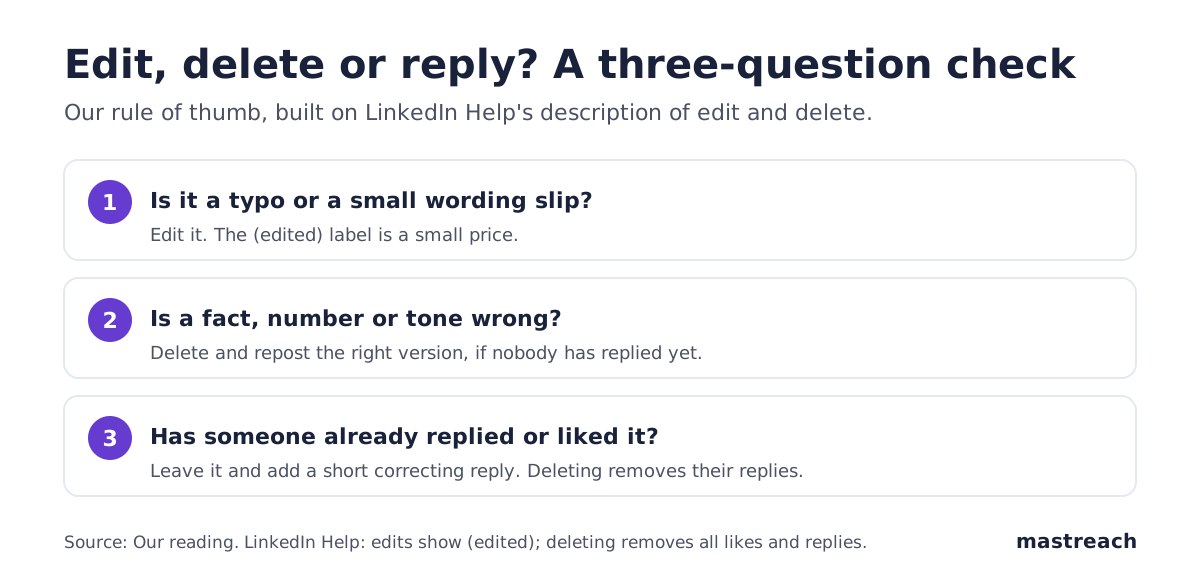
| What went wrong | Best move | Why |
|---|---|---|
| Typo, missing word, autocorrect | Edit | Small, and the point is unchanged |
| Wrong number or wrong name | Delete and repost, if no replies | A label does not hide a wrong fact |
| Tone too sharp | Delete and repost, if no replies | A clean version reads better than a patched one |
| People have replied | Add a reply | Deleting would remove their replies |
An agency owner in Sydney who types "$40,000" instead of "$4,000" should not edit and hope. A short repost with the right figure is cleaner.
What if the mistake is a wrong number or a harsh tone?
Act in the first few minutes, then move on. The sooner you correct a comment, the fewer people see the wrong version.
If someone has already replied, write a short reply under your own comment. For example: "Correction: the figure is $4,000, not $40,000. Thank you for the question." Keep it to one or two sentences. No long apology.
If the tone was the problem, do not rewrite the whole thing in place. Delete it (if no replies) and post a calmer version. Compare our guide to comments that get seen for wording that adds a point without arguing.
What if you cannot find the comment afterwards?
First check it is not simply sorted out of view. Switch the thread to Most recent and look again. Our article on a LinkedIn comment that disappeared walks through five checks, including one on LinkedIn's limits on excessive commenting.
Do not delete and repost the same comment again and again to "bump" it. LinkedIn says on its comments help page that excessive comment creation may limit visibility. Repeated reposting looks like that.
How do you avoid needing to edit at all?
Most fixes come from posting in a hurry. Three habits help, and they take under a minute.
- Read it aloud once. Slips jump out when you hear them.
- Check every number against your own notes. A wrong figure is the one error you cannot patch gracefully.
- Post from the post's page, not from a notification. You see the argument you are answering, so your comment fits it.
The wider habits are in our LinkedIn comments guide: pick posts your buyers read, add one real detail, and post it yourself.
Where Mastreach fits
Most edits and deletions come from comments written in a rush. Mastreach slows that part down just enough for you to get it right.
- Shows posts in your subject that your buyers are reading, so you pick one calmly.
- Gives you angles drawn from the post and a draft in your own voice, to read and change.
- Adds up the impressions LinkedIn shows under each comment, so you see which ones were worth the care.
You read, edit and post every comment yourself. Nothing is posted for you.

You can try it free for 5 days. The card is required, and nothing is charged during the trial.
FAQ
Can you edit a LinkedIn comment on your phone?
LinkedIn Help describes editing from your homepage feed or the Activity section on your profile. It does not list devices on that page, so check the three-dot menu on your own comment in the app you use.
Does LinkedIn tell people when you edit a comment?
LinkedIn does not say on its help page. It only says "(edited)" appears above the comment. One vendor claims the author's notification keeps the old text, but that is unconfirmed.
Can you get a deleted LinkedIn comment back?
LinkedIn Help does not describe any way to restore one, and says its likes and replies are removed. Copy the text before you delete, and repost the corrected version.
Is it better to edit or to reply with a correction?
Edit for typos. If people have already answered, reply with a short correction so their replies stay. This is our rule of thumb, not a LinkedIn rule.
Sources
See what your own comments are reaching.
Mastreach finds the LinkedIn posts your buyers are reading, drafts a comment in your voice, and counts the impressions LinkedIn never adds up for you. You post every comment yourself.
- 914 comments drafted with Mastreach and posted by their owners
- 177,931 LinkedIn impressions on those comments, August to September 2026