LinkedIn AI comments ranked lower: how to stay seen
LinkedIn now pushes suspected AI comments down. What changed on 13 November, what is unconfirmed, and a four-step test to keep your comments visible.
Part of our LinkedIn comments guide: where to comment, what to write, and how to measure what it earns.
LinkedIn now ranks comments it suspects are AI-written lower under a post, and it may stop notifying the author about them. The comments are not deleted, so you can stay visible by writing comments that carry one real fact from your own work.
That is the short version of an announcement made on 13 November 2026. The details matter, and several important ones are still unknown. This page sets out what LinkedIn said, what it did not say, and what a busy consultant can do tomorrow.
What did LinkedIn change about comments on 13 November?
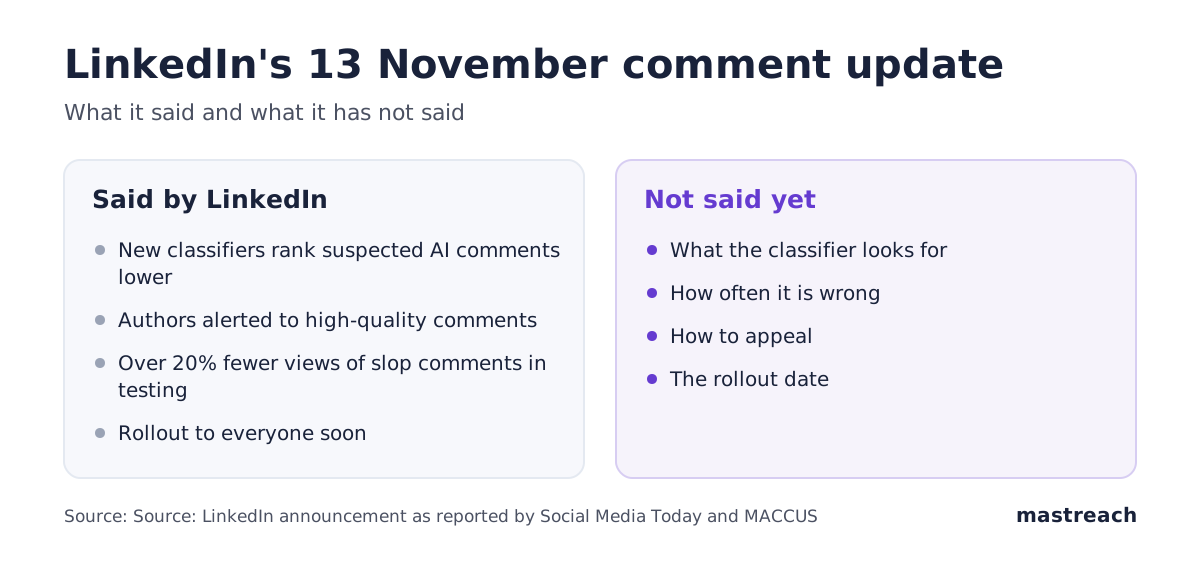
LinkedIn's Chief Product Officer, Hari Srinivasan, announced two changes. The source for both is his own LinkedIn post, as reported by Social Media Today and MACCUS. We could not open the original post, so we rely on these two reports.
- New classifiers for comments. They judge how relevant a comment is and flag suspected AI comments as less valuable. In the default "Most relevant" view, readers should see fewer of them.
- Smarter notifications. Authors are alerted only to "high-quality comments you're likely to care about", in Srinivasan's words as quoted by Social Media Today.
LinkedIn also says that in testing it saw a ">20% reduction in views of slop comments". It added that the changes "will be rolled out to everyone soon". That figure comes from LinkedIn and has no independent check yet.
Does LinkedIn delete AI comments or only move them down?
It moves them down. Social Media Today says LinkedIn is "re-ranking" suspected AI comments rather than removing them. MACCUS adds that LinkedIn's own help page says some comments are only visible under the "Most recent" view.
LinkedIn's help page on comments also says that if it detects "excessive comment creation or use of an automation tool", it may limit the visibility of those comments. That rule was already there before 13 November.
So a demoted comment is still live. If you wonder whether one of yours was demoted, our guide to a LinkedIn comment that seems to have disappeared shows the five checks.
Will the post author still be notified of your comment?
Not always. The announcement says authors will be alerted to high-quality comments. It does not say what happens to the others, and MACCUS notes it is unclear whether the change applies to every member or only some.
This matters for a consultant who comments to start a conversation. A comment the author never sees cannot lead to a reply, a profile visit or a message. Our reading is that the author's notification is now at least as important as the ranking.
Can a comment written by a person be marked as AI by mistake?
Probably, yes. LinkedIn has not published its criteria, its error rate or any way to appeal. MACCUS reports that two members said legitimate comments had been buried. That is two anecdotes, not a measured rate.
LinkedIn has said before that "AI and slop are not the same thing", as MACCUS quotes it. Its target is low-value comments, not every comment where AI helped. We do not know how the classifier tells the difference, and nobody outside LinkedIn does yet.
What kind of comment is likely to stay visible?
LinkedIn has not said what its classifiers look for. Our reading, from what it has described as "low-value" and from the comments we see earn the most, is that four things separate a comment worth keeping from one that gets buried.
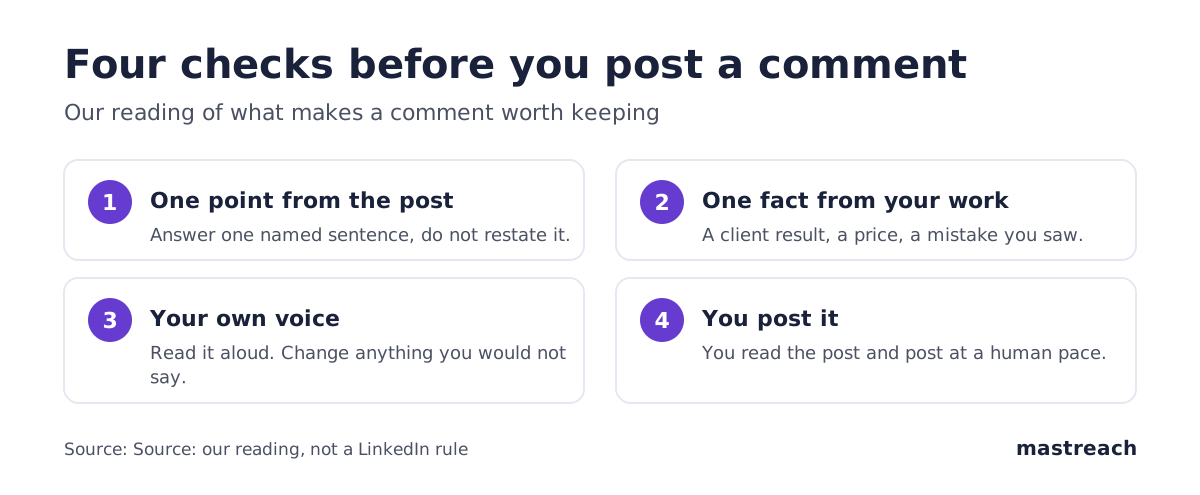
1. It makes one point from the post. A comment that only restates the post adds nothing for the next reader. Name the exact sentence you are answering.
2. It adds one fact from your own work. A UK consultant might add what a client in manufacturing found last quarter. A Dubai agency owner might add what they saw in a tender. An Indian founder might add the price point where buyers stopped.
3. It sounds like you. Read it aloud. If you would never say it to a client, change it.
4. You read the post and you post it yourself. The comment goes out at a human pace, from your own account.
For ten worked examples of comments that pass this test, see our comment examples for consultants. The wider rules on timing, volume and measuring are in our LinkedIn comments guide.
Is it still safe to use AI to help with a comment?
LinkedIn has not said AI help is banned. Its stated target is low-value and automated comments, and its earlier line was that AI and slop are not the same. If you are unsure, our piece on what a "Seems like AI" tip means covers the signal LinkedIn already shows on posts.
What is risky is posting an AI draft without changing it. A draft is a first version. You supply the fact, the sentence only you would write and the decision to post.
How do you check what your comments earned after the change?
LinkedIn shows the impressions for each comment one at a time and totals them nowhere. To see whether the change affects you, record a baseline now and compare in a month.
Here is our own baseline. Between August and September 2026, 914 comments drafted in Mastreach and then posted earned 177,931 impressions, about 195 each. That is before the change, so it tells you nothing about the change itself. Impressions are not unique people, and repeat views and your own views count.
The averages also differ a lot by account. This is worked out from our data, over different periods:
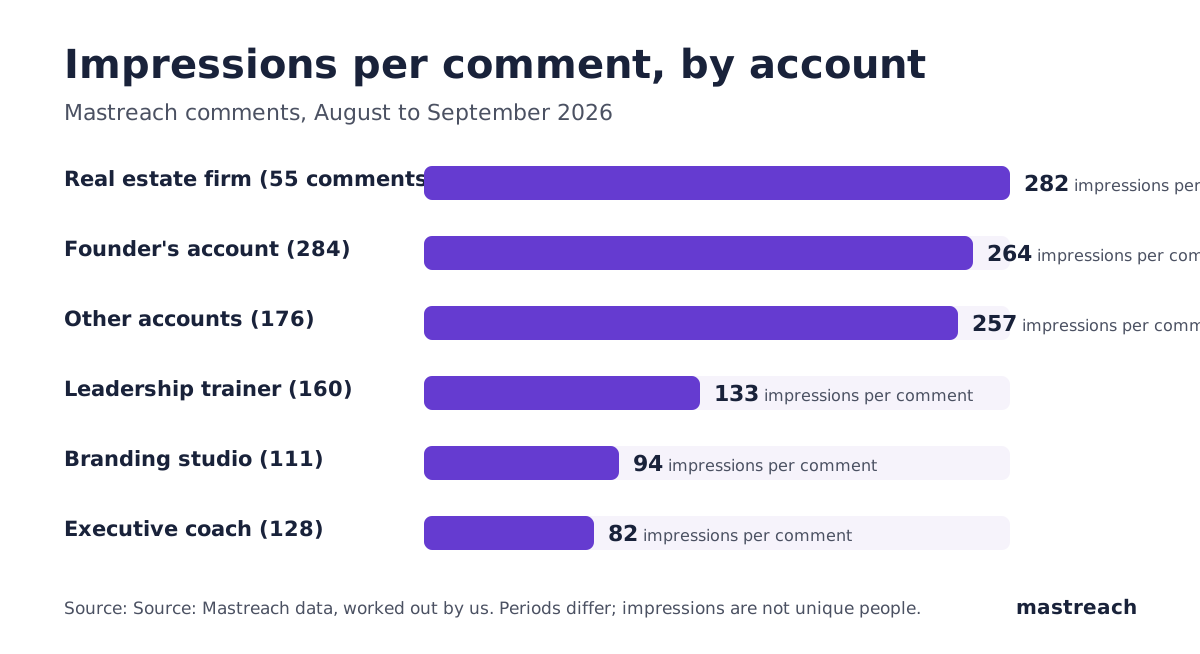
Our reading is that where you comment decides more than how clever the comment is. The groups with the highest averages chose posts their buyers read, though some are small samples. We have no post-impression comparison, so this is a pattern, not proof.

A simple routine: each Friday, write down the impressions of your last ten comments and the post each sat under. After four weeks you have your own baseline, and you will know if the change moved it.
Where Mastreach fits
The risk in this change is the generic comment, and the work is writing a specific one at a steady pace. Mastreach is built around that.
- It shows posts in your subject that your buyers are reading.
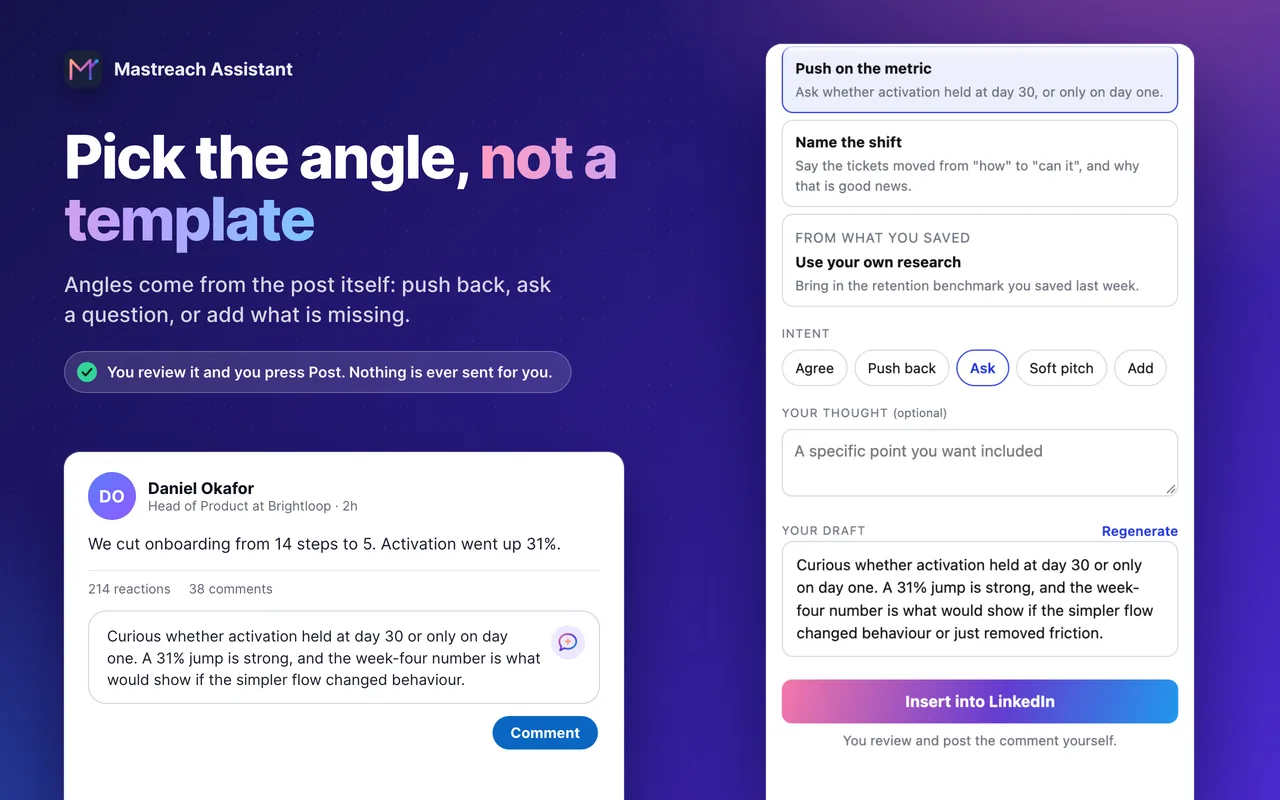
- You pick an angle drawn from the post (push back, ask, add what is missing) and get a draft in your own voice, which you then change with your own fact.
- It records the impressions LinkedIn shows under each comment and adds them up by week, so your baseline is ready.
You edit and post every comment yourself. Mastreach never posts, comments or messages for you.
Plans start at $29 a month at the founding price, and the 5-day free trial needs a card but charges nothing during the trial.
FAQ
Does LinkedIn delete AI-generated comments?
No. LinkedIn is ranking suspected AI comments lower in the default view, not removing them. Some comments may show only when a reader switches to "Most recent".
When will the change reach everyone?
LinkedIn said "soon" and gave no date or list of countries. Treat the rollout as under way and unconfirmed.
Will the post author be told about my comment?
Only if LinkedIn judges it high quality, according to the announcement. How that is decided has not been published.
Does this mean I should stop using AI for comments?
LinkedIn has not said so. Use AI for a first draft if it helps, then add one fact from your own work, edit it into your voice and post it yourself.
Sources
See what your own comments are reaching.
Mastreach finds the LinkedIn posts your buyers are reading, drafts a comment in your voice, and counts the impressions LinkedIn never adds up for you. You post every comment yourself.
- 914 comments drafted with Mastreach and posted by their owners
- 177,931 LinkedIn impressions on those comments, August to September 2026