LinkedIn comment disappeared? 5 checks to find it
Your LinkedIn comment may be live but missing from the default view. Five checks to find it, what LinkedIn says, and how to write comments that stay seen.

Part of our LinkedIn comments guide: where to comment, what to write, and how to measure what it earns.
If your LinkedIn comment has disappeared, it is often not deleted. It may simply not be shown in the default view that most readers use. Check by switching the sort to Most recent, then work through four more checks below.
This matters because a comment nobody sees earns nothing. Here is what LinkedIn says, what is only reported, and how to fix the likely causes.
Is your LinkedIn comment really gone, or just hidden?
Start with the simplest test. Refresh the page, open the post again, and look for your comment in the thread. Then open the sort menu under the comment box and choose Most recent.
LinkedIn lets readers sort comments by Most relevant or Most recent. Most relevant is the default. Commenti and Siela both quote LinkedIn's help text as saying: "Some comments will only be visible under Most recent view."
A note on proof. The version of LinkedIn's comment help page we opened did not show that line. So we treat it as widely quoted, not confirmed by us. LinkedIn does not say which comments are affected or why.
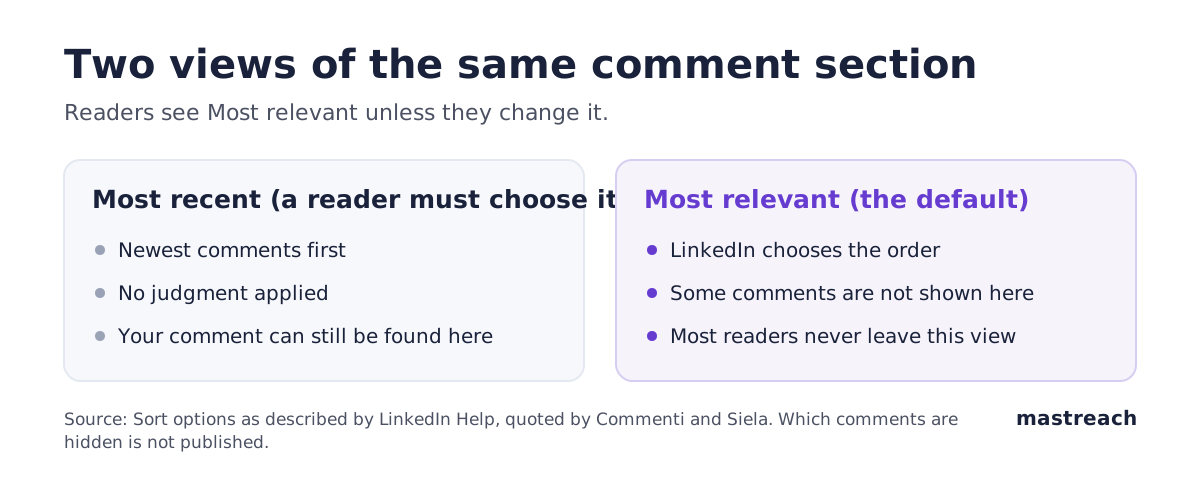
What if the comment is only missing under Most relevant?
Then it is live but not surfaced. The rest of the thread may not show it to readers who never change the sort. You can still reply to your own comment and it stays on the post.
Do not keep checking from your own account. You always see your own comment. Open the post in a private browser window, or ask a colleague in another country to look. That is the only view that matches what a stranger sees.
Can the author or the post settings hide it?
Yes. LinkedIn's help page says:
- Members can disable comments on their posts.
- Members can limit comments to connections only.
- Members can block other members from commenting.
If you are not a first-degree connection, or the author blocked you, you cannot comment, and a comment may not appear as you expect. If the comment box is missing, this is the likely reason. There is nothing to fix on your side.
A founder in Austin and a consultant in Manchester will meet this most on posts from large accounts, which often limit comments.
Does LinkedIn limit the visibility of comments?
It can. The same help page says LinkedIn may limit how many comments a member can make in a certain time period. It names factors: a member's interactions, how many members block the profile, and the verification status of information on the profile. It adds that if it detects "excessive comment creation or use of an automation tool", it may limit the visibility of those comments. It gives no numbers.
Our reading: pace and honesty matter more than any limit we could name. A few thoughtful comments a day, typed and posted by you, is far from "excessive". If you use any tool that posts for you, stop. Our own guide on how many comments per day is safe explains why no published number exists.
Do generic or AI-looking comments get hidden faster?
LinkedIn has said it is acting on this kind of comment. On 4 June 2026 it said its systems would "recognize and take action" on comments posted at scale with automation tools and on "responses that simply restate the original post". It also said: "It's ok to use AI to help you write" as long as comments represent your voice. Read it on LinkedIn News.
What is not confirmed is the speed. On 12 November 2026 one creator, Jeremy Boissinot, posted on LinkedIn that AI comments under his post vanished from the default view after about 20 minutes, and stayed visible under Most recent. Others in his thread said the same. That is one creator's observation, not a LinkedIn statement. We have not found LinkedIn saying that comments are hidden within minutes.

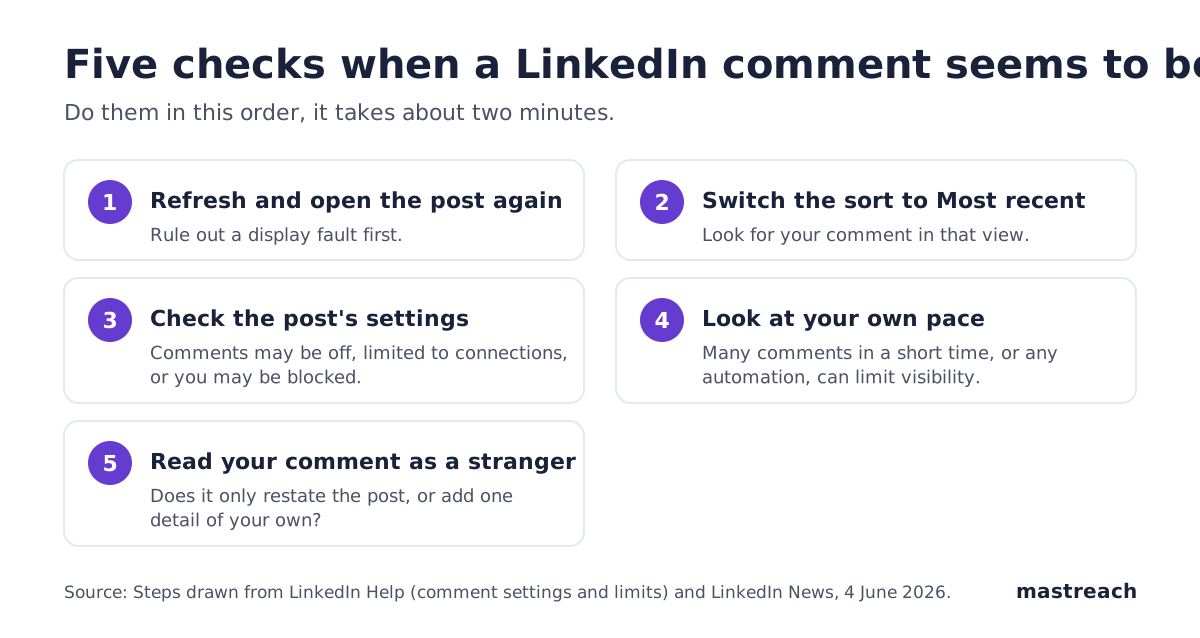
What are the five checks, in order?
- Refresh and reopen the post. Rules out a display fault.
- Switch to Most recent. If it appears there, it is live.
- Check the post's settings. Comments off, connections only, or blocked.
- Check your own pace. Many comments in a short time, or any automation, can limit visibility.
- Read your comment as a stranger. Does it add something?
How do you write a comment that stays visible?
Nobody outside LinkedIn knows the exact rules. But LinkedIn's own words point one way: comments that add "perspective, context, or expertise" are what it wants more of. Three habits follow from that.
- Use one fact from your own work. A number, a client situation, a mistake you made. A Dubai property adviser might write: "In our last two deals the delay was the buyer's lawyer, not the price."
- Do not restate the post. If your first sentence repeats the author, delete it.
- Pick the right room. A comment on a post your buyers read is worth more than ten elsewhere. Our guide to which posts to comment on shows how.
Specific comments also earn pins and replies. See LinkedIn pinned comments for what authors choose to pin.
When should you edit, delete or repost?
If the comment is live under Most recent, leave it. Reposting the same text can look like the excess LinkedIn warns about. If it is generic, edit it to add your detail, or delete it and write a better one later.
Timing can also matter. Our article on the best time to comment looks at whether being early helps. For more on the whole subject, see the LinkedIn comments guide.
Where Mastreach fits
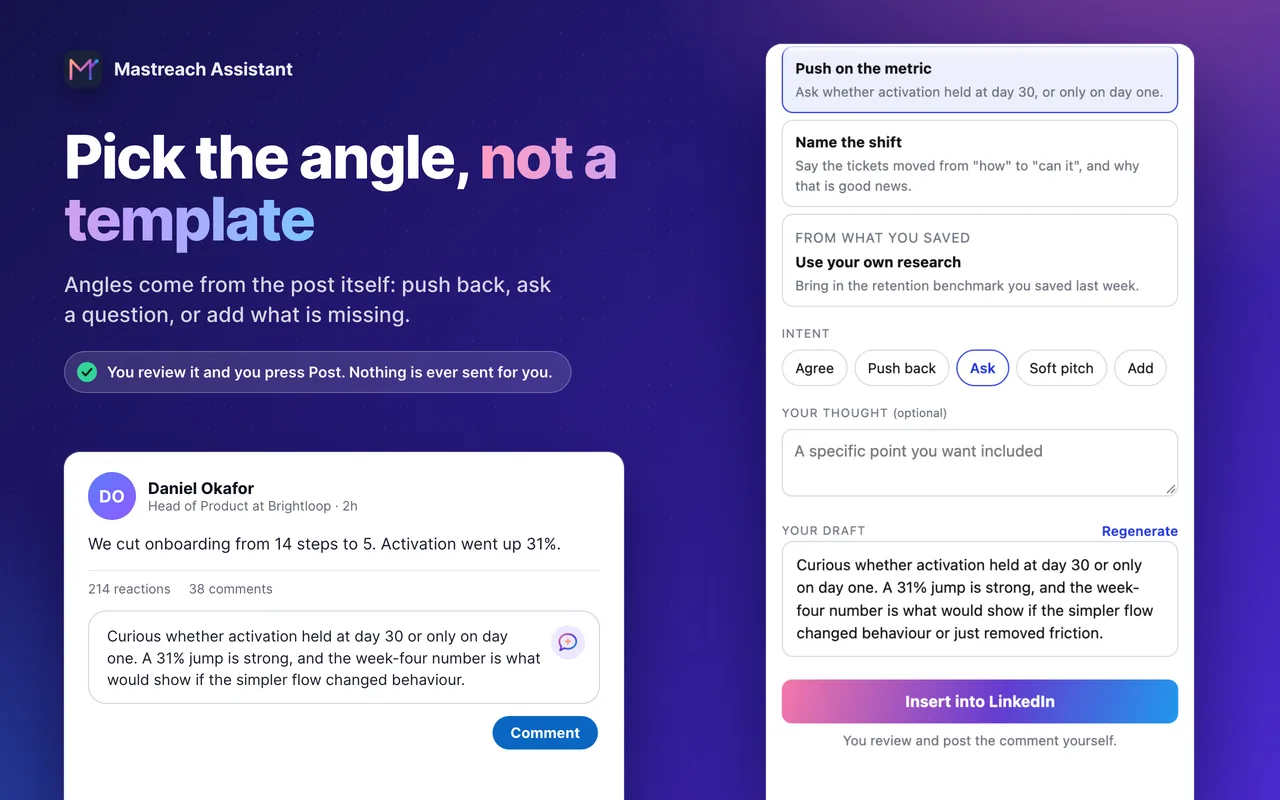
Generic comments are the ones most likely to sit unseen. Mastreach helps you write the other kind.
- It shows posts in your subject that your buyers are reading.
- You pick an angle drawn from the post (push back, ask, add what is missing) and get a draft in your own voice.
- It records the impression count LinkedIn shows under each comment and adds them up by week.
You edit and post every comment yourself. Mastreach never posts, comments or messages for you. Across 914 comments drafted in Mastreach and then posted, LinkedIn showed 177,931 impressions (not unique people).
Try it free for 5 days. A card is needed, and nothing is charged during the trial.
FAQ
Why can I see my comment but others cannot?
You always see your own comment. If it is hidden from others, it may be missing from the Most relevant view, limited by LinkedIn, or blocked by the post's settings. Open the post in a private window to check.
Does LinkedIn delete AI comments?
LinkedIn says it will take action on automated comments and on replies that only restate the post. It also says using AI to help you write is fine. It has not published how or how fast it acts.
Should I delete and repost a missing comment?
Usually no. First check Most recent. Reposting the same text can look like excessive commenting, which LinkedIn says may limit visibility.
Can the post author hide my comment?
Authors can turn comments off, limit them to connections, or block you from commenting. That is separate from LinkedIn's own ranking.
Sources
- Comment on posts and reply to a comment (LinkedIn Help)
- Keeping conversations real on LinkedIn (LinkedIn News, 4 June 2026)
- LinkedIn Comments Most Relevant vs Most Recent (Commenti, 7 November 2026)
- LinkedIn Link in First Comment or in the Post? (Siela, 24 October 2026)
- Jeremy Boissinot, LinkedIn post, 12 November 2026
See what your own comments are reaching.
Mastreach finds the LinkedIn posts your buyers are reading, drafts a comment in your voice, and counts the impressions LinkedIn never adds up for you. You post every comment yourself.
- 914 comments drafted with Mastreach and posted by their owners
- 177,931 LinkedIn impressions on those comments, August to September 2026