LinkedIn comments guide: get seen and win clients (2026)
Where to comment, what to write, how many a day, whether AI help is safe, and how to measure reach. Everything we know about LinkedIn comments.
LinkedIn comments are the fastest way for a founder, coach or consultant with a small following to get in front of buyers. A comment is shown to the readers of the post it sits under, so a good comment on the right post reaches people who have never heard of you. This guide brings together everything we have written about comments: where to comment, what to write, how many is safe, how AI fits in, and how to measure what you get back.
Each section answers one question and links to the full article with the details and sources.
Do LinkedIn comments increase your reach?
Yes, and often more than people expect. A post of your own has to find its readers. A comment borrows the readers of someone else's post. LinkedIn's engineers describe a feed that matches posts to people by topic, including people outside your network (LinkedIn Engineering Blog, 12 March 2026), and a comment is a second route into that feed.
Our own data shows what comments alone can earn. Across 914 comments drafted in Mastreach and posted by their owners between August and September 2026, LinkedIn reported 177,931 impressions, about 195 per comment. The account with the fewest comments, a real estate investment firm with 55, earned the most per comment, about 282. Our reading is that where you comment matters more than how much you comment.
Full numbers and what they do not prove: LinkedIn comments reach: what 914 comments earned.
Which LinkedIn posts should you comment on?
Comment on posts your buyers read, not on whatever your feed shows you. A simple way to find them:
- Ask three clients who they follow on LinkedIn.
- Build a list of 10 to 15 people from those answers.
- Check the list for fresh posts three times a week.
- Pick posts where you can add one real detail from your own work.
Many consultants keep a slightly bigger list, about 30 people: ten likely buyers, fifteen people your buyers read, and five peers who sell next to you. Remember the people you never meet, too. More than 40% of B2B deals stall because the buying group is not aligned, and the finance, legal or operations people behind that are reading expert content quietly.
- Which LinkedIn posts to comment on: a buyer-first method
- LinkedIn engagement list: 30 buyers to comment on
- Why B2B deals stall: the hidden buyer you never meet
What makes a LinkedIn comment get noticed?
LinkedIn now shows comments by their relevance to each reader, using professional interests, connections and engagement activity. The same comment can rank high for one reader and low for another, so being first matters less than being specific to the people you want to reach.
Three things work in your favour:
- One real detail. A number, a client situation or a mistake you have seen. "Great post" adds nothing and gets buried.
- One subject. If your comments stay inside the subject you sell, LinkedIn and your readers learn who you are for. Comments that jump between topics make that harder.
- A point worth keeping. Post authors can pin one helpful comment to the top of the thread again, so a specific comment can sit in front of another person's whole audience.
LinkedIn also lets some readers filter comments to verified members only. Verification is free, but LinkedIn has not said a badge raises a comment's reach. A badge gets you into the filtered view, and a specific comment keeps you there.
- LinkedIn comment ranking: what 'top comment for you' means
- LinkedIn pinned comments are back: write one worth pinning
- LinkedIn Verified Comments Filter: should you verify?
- Why is my LinkedIn reach low? Too many topics
How many LinkedIn comments per day is safe?
LinkedIn does not publish a daily comment limit. Its help page says only that it may limit how many comments you make in a period, and may limit their visibility if it sees excessive volume or an automation tool (LinkedIn Help). The exact numbers you see online have no LinkedIn source.
Our reading is that a few thoughtful comments a day, typed and posted by you, is a safe and useful pace. For most consultants, three to five good comments a week on the right posts is enough to start, and a month is enough to see which authors work.
Can you use AI to write LinkedIn comments?
You can use AI to help, but the comment has to be yours. LinkedIn says it is fine to use AI for help with writing, and it acts against comments posted at scale by automation and replies that only restate the post (LinkedIn Pressroom). Readers can also report a comment as AI slop, and a "Seems like AI" tip in your analytics means enough readers flagged a post.
In March 2026 LinkedIn also named engagement pods, comment automation and unauthorised third-party tools as behaviour it is acting against (LinkedIn Pressroom, 12 March 2026). A tool that posts comments for you is exactly what that announcement describes.
A simple test before you post an AI-assisted comment:
- Does it add one fact from your own work?
- Does it sound like you, not like a press release?
- Did you read the post it answers?
- Are you posting it yourself, at a human pace?
If all four are yes, AI help is not the problem.
- LinkedIn AI slop comments: how to tell if yours is one
- LinkedIn AI slop detection: will your comments be flagged?
- LinkedIn 'Seems like AI' tip: what it means
- Are LinkedIn engagement pods against the rules in 2026?
Should you comment before sending a connection request?
It seems to help. One analysis of 150,000 connection requests, reported by Salescadia, found acceptance of 41% after one or two comments against 27% for cold requests. The lift faded after about two comments and after a day or two. The data is observational, so treat it as a strong hint, not proof.
Details: Comment before connecting on LinkedIn: does it work?
How do you measure what your comments earn?
LinkedIn shows an impression count under each of your comments, visible only to you (LinkedIn Help). It does not add those numbers up anywhere, and the creator dashboard it announced in October 2026 does not list them either. To know what your comments reach in total, collect the number from each comment, by hand or with a tool.
Check after a month, not after a day. Look at which posts gave your comments the most impressions, and spend more of your time on those authors.
A weekly LinkedIn comment routine
Put together, it becomes a short routine:
| When | What to do |
|---|---|
| Once | Build your list of 10 to 30 people your buyers read |
| Three times a week | Check the list for fresh posts, pick one or two where you have a real detail to add |
| Each comment | One point from your own work, in your subject, posted by you |
| Your own posts | Reply to good comments and pin the most useful one |
| Once a month | Add up your comment impressions and keep the authors that worked |
Where Mastreach fits
The slow parts of this routine are finding fresh posts your buyers read, writing a comment worth reading, and adding up what it earned. Mastreach helps with all three, and you stay in charge.
- It shows posts in your subject that your buyers are reading.
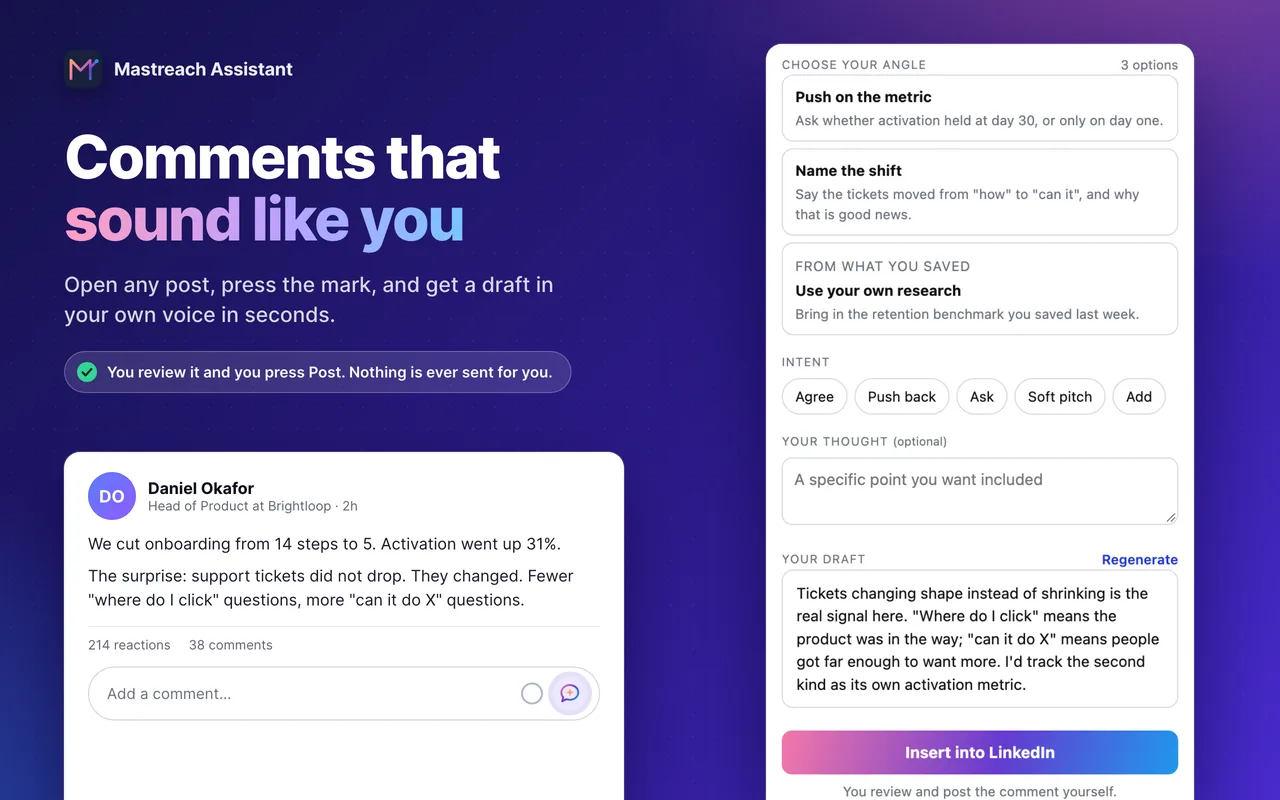
- On any post, you pick an angle (push back, ask, add what is missing) and get a draft in your own voice.
- It records the impressions LinkedIn shows under each comment and adds them up by week, post and author.
You read, edit and post every comment yourself. Mastreach never posts, comments or messages for you.
Plans start at $29 a month at the founding price, and the 5-day free trial needs a card but charges nothing during the trial.
FAQ
Do LinkedIn comments get impressions?
Yes. LinkedIn shows an impression count under each comment you write, visible only to you. Across 914 comments drafted with Mastreach, LinkedIn reported 177,931 impressions, about 195 per comment.
Are comments better than posts on LinkedIn?
Our data cannot prove comments beat posts. A comment does reach the readers of someone else's post, so for a small account it is often the faster way to be seen by buyers. Many people do both.
How long should a LinkedIn comment be?
Long enough to add one real point, usually two to four sentences. A one-line "Great post" adds nothing, and a long essay rarely gets read under someone else's post.
Is it safe to use a tool for LinkedIn comments?
A tool that finds posts or drafts text you edit is a writing aid. A tool that posts comments for you, at scale, is the automation LinkedIn says it acts against. Post every comment yourself.
How many comments do I need before I see results?
LinkedIn publishes no number. Our reading is that three to five good comments a week on posts your buyers read, checked after a month, is enough to see which authors work for you.
Sources
- LinkedIn Engineering Blog: Engineering the next generation of LinkedIn's Feed, 12 March 2026
- LinkedIn Pressroom: How LinkedIn Is Improving the Feed, 12 March 2026
- Keeping conversations real on LinkedIn (LinkedIn Pressroom)
- Comment on posts and reply to a comment (LinkedIn Help)
- View analytics for your comments (LinkedIn Help)
- Comment Before You Connect: The 14-Point LinkedIn Acceptance Lift (Salescadia)
- Mastreach account data, August to September 2026. Only comments drafted in Mastreach and then posted are counted.
Every article on LinkedIn comments
- How long should a LinkedIn comment be? What data saysThe "15 words" rule is repeated everywhere but cannot be checked. What open studies show about comment length, and a simple rule you can use tomorrow.
- LinkedIn feed views up 16%: should you post more?LinkedIn says feed views are up 16% and daily posters are growing fast. What it means for a small consultant, and a two-week test before you post more.
- LinkedIn engagement list: 30 buyers to comment onBuild a LinkedIn engagement list of 30 buyers in two hours: who to include, how to find them with a small network, and a 30-minute weekly routine.
- LinkedIn Verified Comments Filter: Should You Verify?LinkedIn lets readers filter comments to verified members. What is confirmed, what is not, and how to write comments that earn attention.
- Get Clients on LinkedIn With a Small FollowingA small LinkedIn following does not stop you winning clients. What two 2026 datasets show, and a four-week plan for under 1,000 connections.
- LinkedIn pinned comments are back: write one worth pinningPost authors can pin one comment to the top of the thread again. Who can pin, why a pinned comment matters, and what makes a comment worth pinning.
- Which LinkedIn posts to comment on: a buyer-first methodWhich LinkedIn posts should a consultant comment on? Start from the people your buyers read, not your feed. A simple method for busy founders and coaches.
- How Many LinkedIn Comments Per Day Is Too Many?LinkedIn publishes no daily comment limit. What its help pages say, why vendor numbers have no source, and a calm daily pace for busy professionals.
- LinkedIn comment ranking: what 'top comment for you' meansLinkedIn now orders comments by relevance to each reader. What is known, what is not, and how founders and consultants should comment in response.
- Comment before connecting on LinkedIn: does it work?Does a comment before a connection request help? Vendor data says acceptance rises from about 27% to 41%. What it shows, what it cannot prove.
- LinkedIn AI slop detection: will your comments be flagged?LinkedIn now checks posts shown beyond your network for AI slop, at 94% precision. What it means for comments, plus a 4-point test before you post.
- LinkedIn AI slop comments: how to tell if yours is oneLinkedIn now lets people report comments as AI slop. What it counts as slop, what it allows, and how to keep your own voice in a comment.
- LinkedIn comment impressions: where to find themLinkedIn shows impressions on each comment, but never in a dashboard. Where to find them, what they count, and how to add them up.
- LinkedIn comments reach: what 914 comments earnedA comment is shown to everyone reading the post it sits under. Here is what 914 real comments earned on LinkedIn: 177,931 impressions.
- Are LinkedIn engagement pods against the rules in 2026?Yes. LinkedIn named engagement pods and comment automation as behaviour it acts against. What it said, and what works better instead.
See what your own comments are reaching.
Mastreach finds the LinkedIn posts your buyers are reading, drafts a comment in your voice, and counts the impressions LinkedIn never adds up for you. You post every comment yourself.
- 914 comments drafted with Mastreach and posted by their owners
- 177,931 LinkedIn impressions on those comments, August to September 2026