LinkedIn comment impressions: where to find them
LinkedIn shows impressions on each comment, but never in a dashboard. Where to find them, what they count, and how to add them up.

Part of our LinkedIn comments guide: where to comment, what to write, and how to measure what it earns.
Ask most people on LinkedIn how many impressions their posts got last month and they can tell you in two clicks. Ask how many impressions their comments got and almost nobody knows. That is not because the number does not exist. LinkedIn records it for every comment. It just never adds it up for you.
Where can you see impressions on a LinkedIn comment?
Under the comment itself. LinkedIn's help page says impressions "show as part of the comment", for example in the feed or in a LinkedIn Group (LinkedIn Help: View analytics for your comments). Open a post you commented on, find your comment, and the impression count appears with it.
Three rules from the same page are worth knowing:
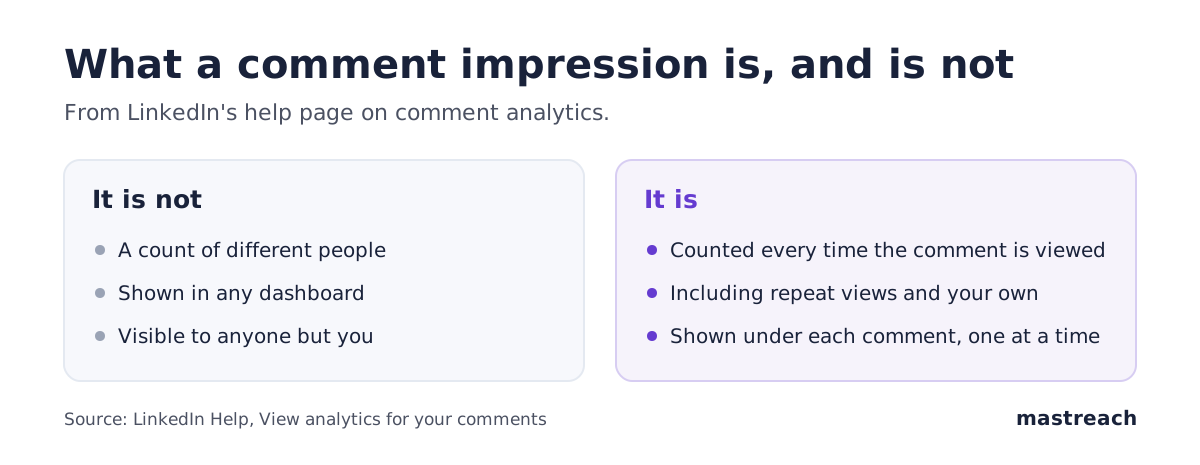
- Only you can see it. "Only you can view the impressions of your comments." Other readers do not see your number. For a Company Page, the page's admins can see impressions on comments made as the page.
- It is not in any dashboard. "Comment impressions are not shown in any dashboard." Your analytics page covers posts, not comments, and LinkedIn's new creator dashboard is about posts too (what to check in it).
- It is one comment at a time. There is no total, no weekly view and no list of your best comments.
What does a LinkedIn comment impression count?
A comment impression is counted each time someone views your comment. LinkedIn is explicit that the count is not unique: "if the same member views a comment twice, it is counted as two comment impressions." Your own views are counted as well.
So treat the number as a measure of attention, not of people:
- It is not unique readers. 1,000 impressions might be 700 people, some of whom saw it twice.
- Your own visits inflate it slightly. Checking a comment five times adds five. On a comment with hundreds of impressions this is noise; on a comment with twelve it is not.
- It is still the only number there is. For comparing one comment against another, or one month against the next, it does the job.
Why your comment reach is probably bigger than you think
Comments travel with the post they sit under. A comment on a busy post in your subject can be seen by many people who have never visited your profile. Since LinkedIn's 2026 feed matches content by topic (what changed), that audience is often outside your network. Because the number is hidden in each comment, that reach goes uncounted, and people conclude LinkedIn is not working for them when a large part of it is.
When we added up comments drafted in Mastreach between August and September 2026, 914 comments had earned 177,931 impressions. Our founder's own account had 74,888 impressions on 284 comments over two months. None of that appeared on any LinkedIn analytics screen. More on that data in do LinkedIn comments reach more people than posts?
How to add up your LinkedIn comment impressions by hand
It can be done. It is just slow.
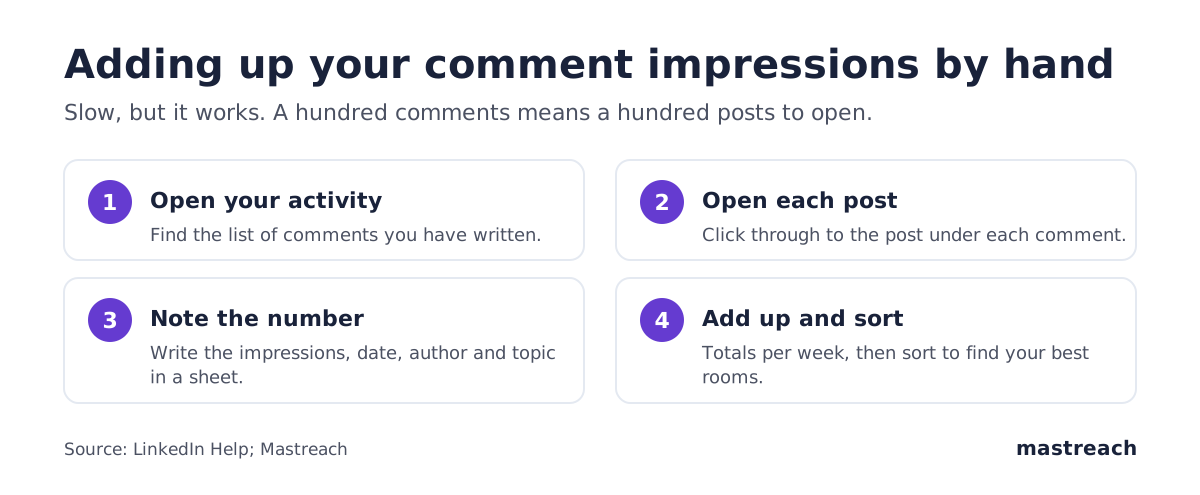
- Open your activity. On your profile, open your Activity and look for your comments. The exact menu names vary between the app and desktop, so check the path in yours.
- Open each post. Click through to the post for each comment.
- Find your comment and note the number. Write the impressions into a spreadsheet with the date, the post's author and the topic.
- Repeat for every comment. A hundred comments means opening a hundred posts.
- Add it up and sort. Totals per week tell you whether your comment reach is growing. Sorting by impressions tells you which rooms were worth it.
Two practical warnings. Impressions can keep rising while people are still reading the post, so a count taken the same day may understate it. And because the number is not unique, compare like with like: this month against last month, not against someone else's account.

What to do with the number once you have it
The total is satisfying. The breakdown is useful.
- Which posts worked. Group your comments by the author of the post. A few authors will account for most of your impressions. Those are your rooms.
- Which topics worked. If comments on one subject travel and others do not, that is LinkedIn telling you what it thinks you are about. See why one subject beats five.
- Whether a quiet month is real. Compare your total with your own four-week baseline before you change anything (how to tell noise from a real drop).
- Who came back. The people who react to your comments again and again are your warmest audience, and many of them do not follow you yet.
Is there a faster way?
Yes. Mastreach records the impression count on each comment you write with it and adds them up for you: totals by week, the posts and authors that brought the most reach, and the people who keep reading you. You still write and post every comment yourself. If you want to see your own number, start with an analysis of your profile and comment reach.
Where Mastreach fits
Counting by hand works, but few people keep it up past the second week. Mastreach does the counting as part of writing:
- You comment with it. It finds posts in your subject and drafts a comment in your voice. You edit and post it yourself.
- It records the reach. It reads the impression count LinkedIn shows under each of your comments.
- It adds it up. You see totals by week, the posts and authors that brought the most reach, and the people who keep coming back.
That is how we got the 914 comments and 177,931 impressions quoted above. You can try it free for 5 days.

FAQ
Can other people see my LinkedIn comment impressions?
No. LinkedIn says only you can see the impressions on your own comments. For comments made as a Company Page, the page's admins can see them.
Why don't comment impressions show in LinkedIn analytics?
LinkedIn's help page says comment impressions are not shown in any dashboard. They appear only as part of each individual comment, which is why most people never total them.
Do my own views count as comment impressions?
Yes. LinkedIn counts your own views towards the impression count, and the count is non-unique, so the same person viewing a comment twice counts as two impressions.
How long do LinkedIn comment impressions keep growing?
LinkedIn does not say. In practice a comment keeps collecting impressions while people are still reading the post it sits under, so it is worth checking again a few days later.
Sources
- LinkedIn Help: View analytics for your comments
- Mastreach account data, August to September 2026. Only comments drafted in Mastreach and then posted are counted.
See what your own comments are reaching.
Mastreach finds the LinkedIn posts your buyers are reading, drafts a comment in your voice, and counts the impressions LinkedIn never adds up for you. You post every comment yourself.
- 914 comments drafted with Mastreach and posted by their owners
- 177,931 LinkedIn impressions on those comments, August to September 2026