LinkedIn AI slop comments: how to tell if yours is one
LinkedIn now lets people report comments as AI slop. What it counts as slop, what it allows, and how to keep your own voice in a comment.

Part of our LinkedIn comments guide: where to comment, what to write, and how to measure what it earns.
Is a LinkedIn comment written with AI "AI slop"? Not by itself. LinkedIn says AI is fine for helping you write, but a comment that is generic, restates the post, or is posted by a tool at scale is what it is acting against. Below is what LinkedIn has actually said, what a flaggable comment looks like, and a simple way to keep your voice.
What does LinkedIn mean by AI slop in comments?
LinkedIn defines it as low-effort, AI-generated content that sounds polished but has no real perspective. In its own words, it is content that "lacks any real unique perspective or substance" (LinkedIn Pressroom).
Notice the word is not "AI". It is "generic". LinkedIn's chief product officer, Hari Srinivasan, put it plainly: "AI and slop are not the same thing," and many people refine their thoughts with AI, according to GCN's report.
For comments, LinkedIn names two things it will recognise and act on:
- Comments members post at scale using automation tools, with little or no human involvement.
- Responses that simply restate the original post without sharing anything new.
When content looks generic, LinkedIn says it is less likely to spread beyond a person's immediate network. So the cost is not a ban. It is that your comment stops travelling.
Can anyone report my comment as AI slop now?
Yes. According to GCN, LinkedIn announced on July 30, 2026 a "Seems like AI slop" option in the three-dot menu. A LinkedIn spokesperson confirmed it will be available on all posts and comments.
What happens after a report is less clear. LinkedIn has said reports help it tune its classifiers, the systems that spot generic content. An analysis by Magica notes that LinkedIn has not said a report removes a comment or penalises its author. We agree with that caution: nobody outside LinkedIn knows the exact effect, so do not trust anyone who claims to.
One expert view, from AJ Wilcox in Social Media Examiner, is that flagged AI comments tend to get very few likes and replies, so they sink on their own. That is an opinion, not a LinkedIn rule. Our reading is the same in practice: a comment nobody responds to rarely helps you.
Is using AI to draft a LinkedIn comment allowed?
Yes, with a condition. LinkedIn writes: "It's ok to use AI to help you write." The condition that follows is that your comments must represent your own voice and perspective.
LinkedIn also reports that its systems correctly identified generic content 94% of the time in initial testing. That is LinkedIn's own figure, and it refers to generic content in general, not to comments drafted with AI.
So the question to ask is not "did a tool help me?" It is "is there something of mine in this comment?" If you took a draft, added a real example from your work and posted it yourself, you are on the right side of what LinkedIn describes. If a tool posted it for you, you are not. (We cover the automation side in LinkedIn engagement pods and auto-comment tools.)
Which comments look like slop, and which do not?
Take a post from a consultant: "Many Indian MSMEs wait 60 to 90 days for client payments. Cash flow, not sales, is their real problem."
A comment that gets ignored:
"Great insights! Cash flow is indeed a critical challenge for MSMEs. Thanks for sharing."
It restates the post. It could sit under a thousand posts. Nobody learns anything from it.
A comment in a human voice:
"Saw this with a Pune auto-parts client. They offered 2% off for payment within 10 days, and about a third of buyers took it. Did you see anything similar?"
It has a place, a number, a result and a question. It cannot be copied under another post.
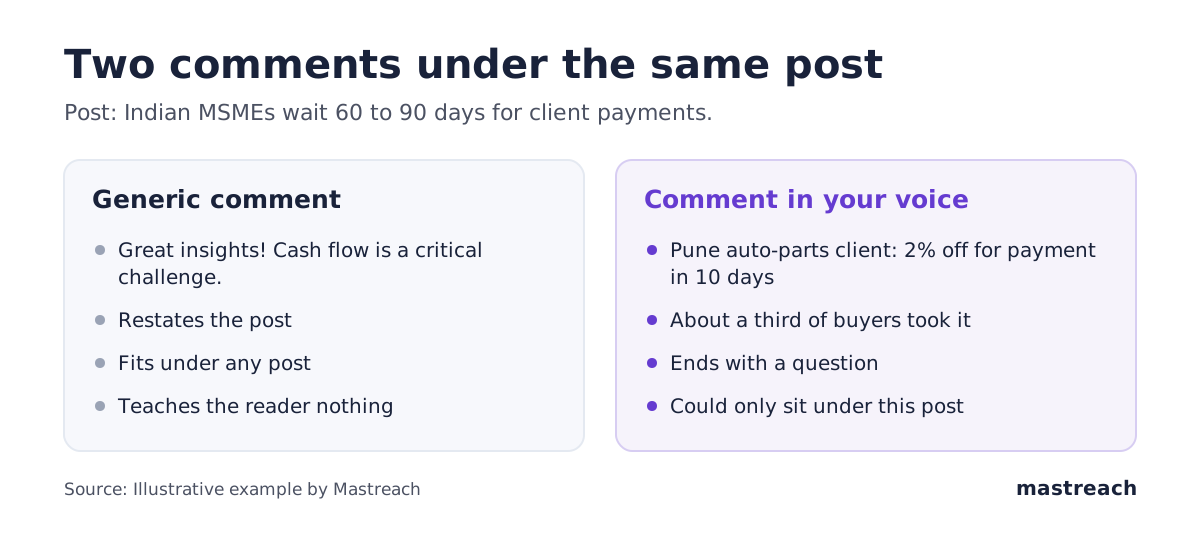
Our reading, not a LinkedIn rule: a good test is whether you could paste the comment under a different post and it would still make sense. If yes, it is probably generic.
How do I keep my voice in a comment I drafted with AI?
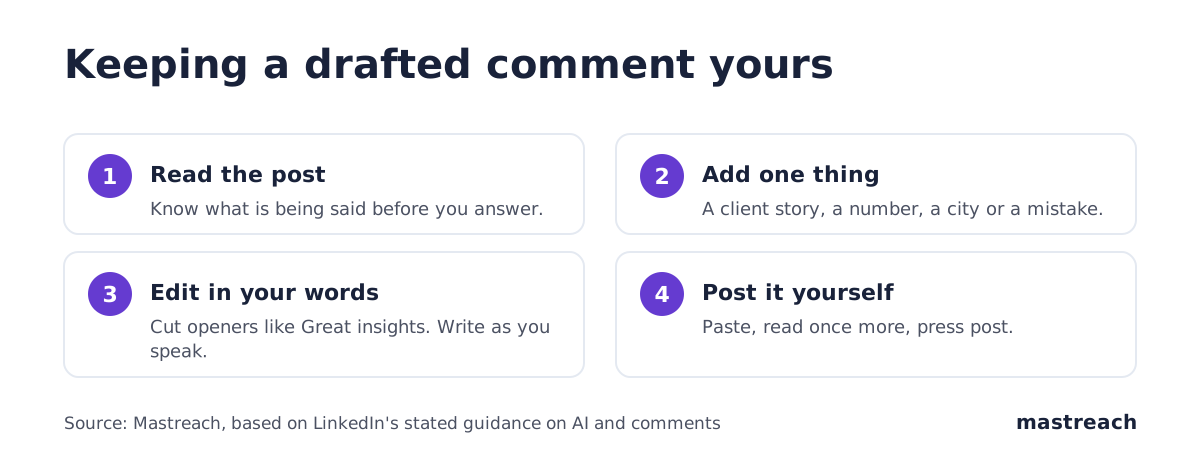
Treat the draft as a first pass, then do four things.
- Read the post to the end. Know what is being said before you answer it.
- Add one thing only you can add. A client story, a number, a city, a mistake you made. One is enough.
- Cut the filler. Delete openers like "Great insights" and closers like "Thanks for sharing". Write the way you speak.
- Post it yourself. Open LinkedIn, paste, read once more, press post.
Short sentences help. So does an ordinary mistake or two. AJ Wilcox lists patterns that read as AI, such as dramatic lines like "this is silently killing you" and emojis that do not match your usual style. Do not try to hide a generic comment with tricks. Make it specific.

What should I do if my comments get few replies?
First, check whether it is the comment or the post. A good comment under a quiet post is seen by few people. We saw this in our own data: where you comment matters a great deal (see what 914 comments earned).
Then look at each comment's impressions, which LinkedIn shows one comment at a time (where to find them). Compare your best and worst. Usually the better ones have a specific example and sit under a busy post.
A fair number from our side: across 914 comments drafted in Mastreach and then posted by their owners, LinkedIn reported 177,931 impressions, about 195 per comment. Impressions are not unique people, since repeat views and your own views count. We also have no comparison with the same accounts' posts. We share it only to show that drafted, edited and self-posted comments do get seen.
Why does posting every comment yourself matter?
Because "little or no human involvement" is the exact phrase LinkedIn uses for the comments it is acting against. The easiest way to stay well clear of that line is to be the human involved, every time.
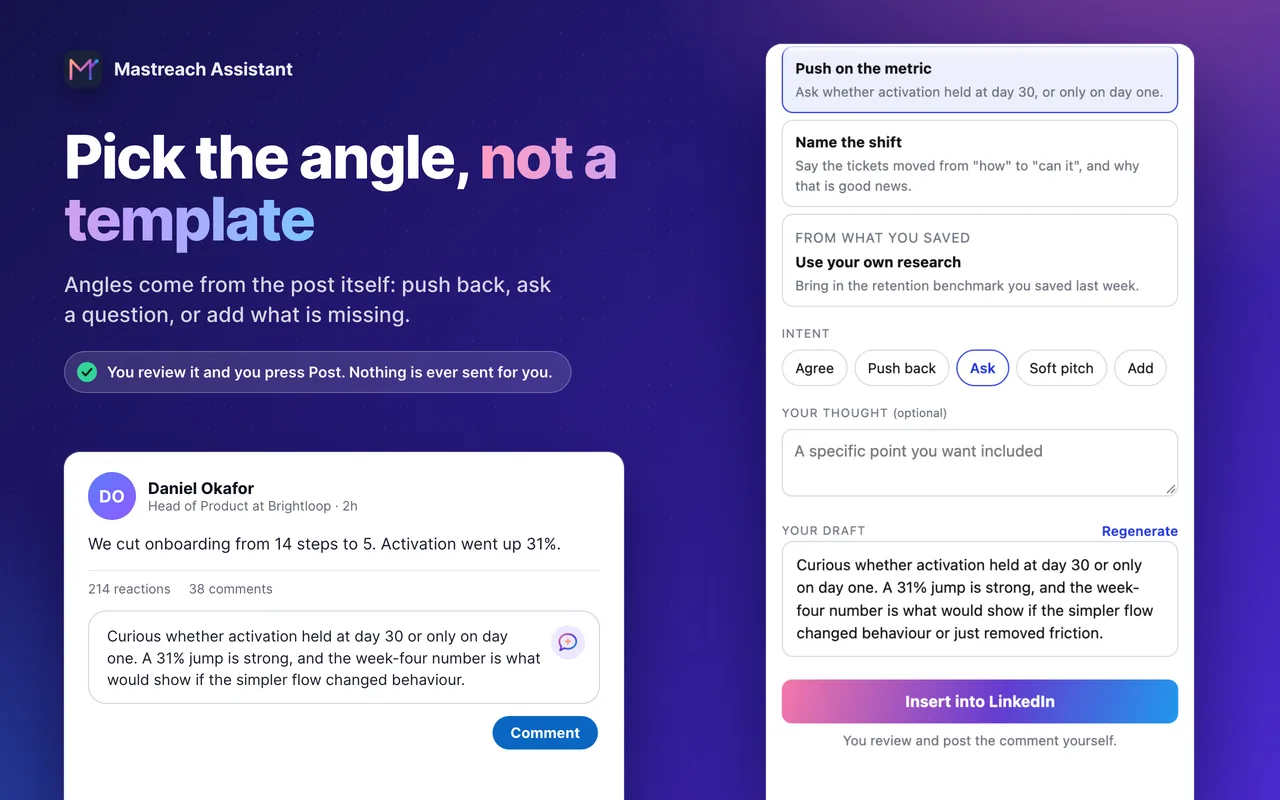
This is how Mastreach is built. It finds posts your buyers read and drafts a comment in your voice. You read it, edit it and post it. It never posts, comments or messages for you. We built it that way because we think that is also what makes the comment worth reading.
Where Mastreach fits
Everything in this article points to one test: does the comment carry something of yours, and did you post it yourself? Mastreach is built around that test.
- It starts from the post. It suggests angles from what the post actually says: push back on a number, ask the question nobody asked, add what is missing.
- It writes in your voice. Drafts use your own way of writing and anything you saved to your knowledge base, so the comment has your detail in it.
- You stay in charge. You read, change and post every comment. Mastreach never posts, comments or messages for you.
You can try it free for 5 days and see whether the drafts sound like you.
FAQ
Will LinkedIn ban me for using AI in comments?
LinkedIn has not said so. It says using AI to help you write is fine, and it is acting against comments posted at scale by automation and replies that only restate the post. A few thoughtful comments you edit and post yourself are far from that.
Can LinkedIn tell if my comment was written by AI?
LinkedIn says its systems are trained to spot generic, repetitive content, and reports 94% correct identification in its own initial testing. It looks for missing perspective, not for the use of a tool. A comment with a real example reads differently from filler.
Does the "Seems like AI slop" button remove my comment?
LinkedIn has not said that a report removes a comment or penalises you. It says reports help improve its detection. The exact effect is not public, so treat any firm claim as unconfirmed.
How many comments a day is safe?
LinkedIn has not given a number. Its concern is volume with no human involvement. In our experience, a handful of comments a day that you write or edit yourself is easy to keep genuine.
Sources
See what your own comments are reaching.
Mastreach finds the LinkedIn posts your buyers are reading, drafts a comment in your voice, and counts the impressions LinkedIn never adds up for you. You post every comment yourself.
- 914 comments drafted with Mastreach and posted by their owners
- 177,931 LinkedIn impressions on those comments, August to September 2026