Comment before connecting on LinkedIn: does it work?
Does a comment before a connection request help? Vendor data says acceptance rises from about 27% to 41%. What it shows, what it cannot prove.

Part of our LinkedIn comments guide: where to comment, what to write, and how to measure what it earns.
Yes, commenting on a person's post before you send a connection request seems to help. In the largest dataset we found, reported by Salescadia, acceptance rose from 27% for cold requests to 41% after one or two comments. The effect is real enough to try, and small enough that you should not build a whole plan on it.
This article looks at the numbers, who produced them, and how a busy founder or consultant can use the idea by hand in about ten minutes, with no automation.
What do the 2026 acceptance numbers say?
Salescadia reports an analysis by Extrovert of more than 150,000 connection requests, split by what the sender did first. We have not seen the original study, so these are second-hand figures.
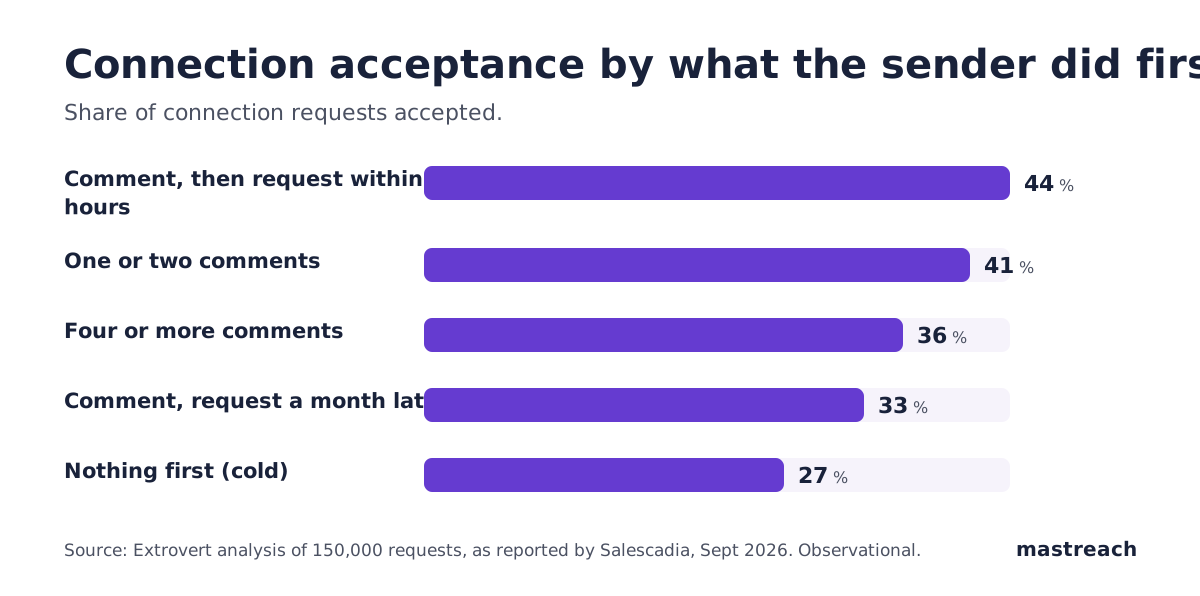
Three points stand out:
- The lift is large. Fourteen points between cold (27%) and one or two comments (41%).
- It fades with more comments. Four or more comments scored 36%, lower than one or two.
- It fades with time. A request within 24 hours of the comment scored 44%. A request a month later scored 33%.
A second vendor guide, from SocialNexis, claims warmed requests reach 45% to 60%. It gives no study behind that range, so we do not rely on it. It does cite a useful baseline: Expandi's analysis of 13.2 million requests, with cold acceptance near 28.5%. Expandi's own 2026 outreach report puts the connection approval benchmark at 29.61%.
So a cold request is accepted a little under three times in ten. A well-timed comment may move that toward four or five in ten.
How far can you trust these numbers?
Not completely. Here is why.
The data is observational. Salescadia says so itself. People who comment thoughtfully may also choose better prospects, and better prospects accept more often. The comment and the good targeting arrive together.
The sources sell tools. Expandi, SocialNexis and Salescadia all work in outreach software. That does not make the numbers false. It means each one has a reason to make warming look good, so look for the pattern across sources rather than one headline figure.
Warm-up is not all equal. Expandi's own report says campaigns that view a profile, like a post and follow before connecting were approved at 22%. That is below its 29.61% overall benchmark. Salescadia, citing other data, says profile views alone do not move acceptance. The difference, in our reading, is visibility. A profile view is nearly invisible. A comment puts your name beside a sentence the person can read.
We have no acceptance data of our own. Mastreach helps people write comments, not connection requests. What we do have is how widely comments are read. Across 914 comments drafted in Mastreach and then posted, LinkedIn reported 177,931 impressions, about 195 per comment. Those are impressions, not unique people, and repeat views and the author's own views are included. We have no before-and-after comparison for these accounts. It shows comments get seen. It does not show that a comment makes someone accept a request.
How many comments are enough before you connect?
One or two. The reported data peaks there, and a third or fourth comment on the same person starts to look like a campaign.
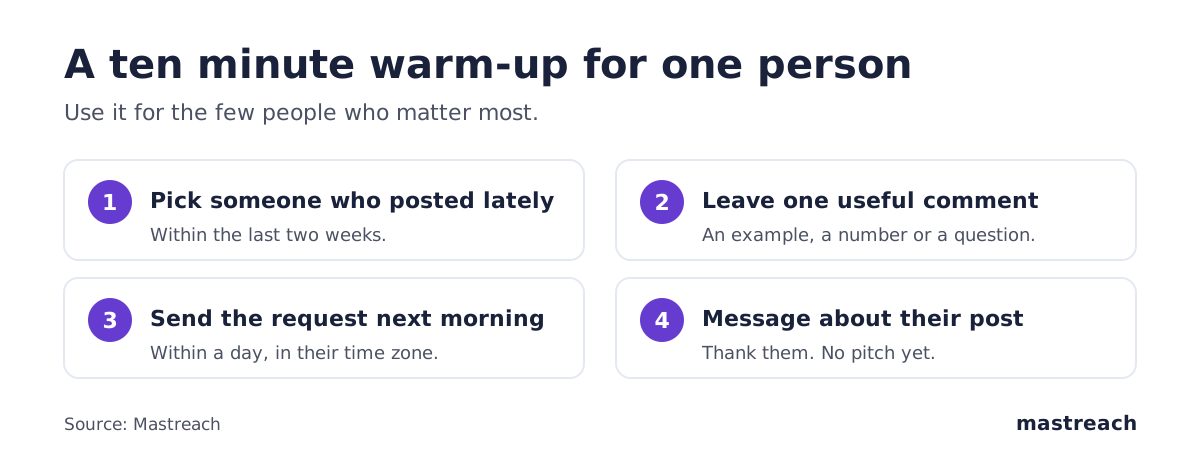
For a senior buyer who posts rarely, one good comment is often the right number. If they have not posted in months, a comment may land on an old post where nobody is reading. Pick people who have posted in the last two weeks.
For more on why the choice of post matters more than volume, see what 914 comments earned.
How soon after the comment should you send the request?
Within a day or two. In the reported data, a request within 24 hours scored 44%, against 33% after a month.
The reason is simple. The person has seen your name next to something relevant, recently. A request that arrives while that memory is fresh gives them a reason to say yes. A request that arrives a month later is a stranger again.
Do not send the request in the same minute as the comment. It looks mechanical. Wait until the next morning in their time zone, which matters if you work across the US, UK, Gulf and India.
What should the comment say if the buyer is senior and busy?
Add one useful thing. Do not praise, pitch or ask for anything.
Good comments share a short example from your own work, a number that supports or tests their point, or a respectful question about one detail. "Great post" works like a like with extra steps.
Imagine these, in different places:
- A UK tax consultant comments on a CFO's post about late payments with one specific example from a client in the construction trade.
- A Dubai logistics firm adds a regional detail to an operations director's post about port delays.
- An Indian software founder asks a US agency owner how they handle one point in a pricing post.
Each takes two to four sentences. Write them in your own voice, as you would speak to the person at an event. If you use an assistant for a first draft, edit it until it sounds like you. Our piece on AI comments that sound the same explains what readers notice.
What do you write after they accept?
Say thank you and refer to the post. Do not pitch in the first message.
Something like: "Thanks for connecting. I enjoyed your point about supplier payment terms. I wrote a short note on how we handle that for two clients, and I am happy to send it if useful."
SocialNexis, citing Expandi data, reports that replies to connection notes fell from 3.5% to 2.2% in a year, while replies to later messages held steady near 10%. In other words, the first note is often ignored, and the conversation starts after the connection. Make that first message about them.
When is warming a waste of your time?
Warming is not worth it when:
- The person never posts. Nobody will see your comment.
- The post is old. A comment under last year's post is invisible.
- You are not a good fit. A thoughtful comment from a bad-fit sender is still a bad-fit request.
- You are sending hundreds. At volume, the extra time per person outweighs the gain, and it drifts toward automation. Our article on pods and comment automation covers why.
Warming suits a consultant who wants five to ten good conversations a month, not a thousand contacts.

Be honest with yourself about the result, too. Count how many of your warmed requests are accepted over a month. If it is no better than your cold rate, the problem is probably the profile or the fit, not the timing.
Where Mastreach fits
The hard part of warming someone up is not the connection request. It is finding the right post of theirs, or a post they are reading, and writing a comment worth noticing when you are busy. That is the part Mastreach does.
- Find the post. Mastreach shows you LinkedIn posts in your subject that the people you want to reach are reading.
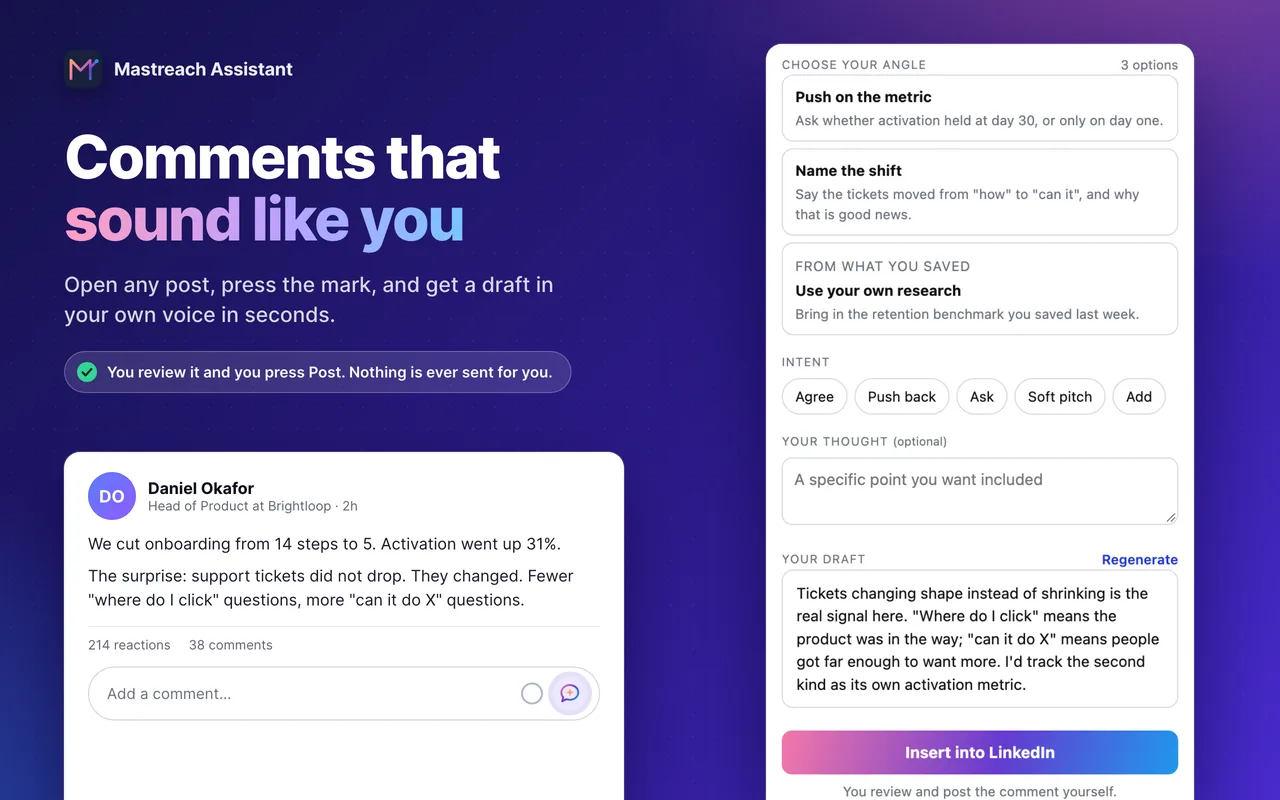
- Draft the comment. Press the Mastreach mark on the post, pick an angle, and get a draft in your own voice that adds one real point.
- Post it yourself. You read it, change what you like and post it. Mastreach never comments, connects or messages for you.
It also adds up the impressions your comments earn, which LinkedIn shows one comment at a time. You can try it free for 5 days.
FAQ
Do I need to comment before every connection request?
No. Use it for people you most want to know, such as a buyer, a referrer or a peer you respect. For a classmate or a former colleague, a plain request is fine.
Is it bad form to comment only to get a connection?
Not if the comment is honest and useful. The test is simple: would you be happy to have written it even if they never accepted? If yes, it is good practice. If the comment is empty, it is a trick, and readers can tell.
Does commenting help even if they do not accept?
It can. A comment is shown to everyone reading that post, not only the author. Our own data shows comments are read, though impressions are not unique people. We cover this in what comment impressions mean.
Should I use automation to do this at scale?
We do not advise it. Reaching more people with less care is the opposite of why the comment works. Mastreach itself never posts or sends anything for you. You read, edit and post every comment.
Sources
See what your own comments are reaching.
Mastreach finds the LinkedIn posts your buyers are reading, drafts a comment in your voice, and counts the impressions LinkedIn never adds up for you. You post every comment yourself.
- 914 comments drafted with Mastreach and posted by their owners
- 177,931 LinkedIn impressions on those comments, August to September 2026