LinkedIn 'Seems like AI' tip: what it means
A "Seems like AI" tip in your LinkedIn post analytics is not a penalty. What LinkedIn says it means, and four steps to take next.

What does the "Seems like AI" tip in LinkedIn post analytics mean? It means enough readers marked your post as AI slop that LinkedIn now shows you a private message about it. LinkedIn Help says this is not a takedown and not a policy decision about your content. It is a signal, and you can act on it.
What is the "Seems like AI" tip in LinkedIn analytics?
In August 2026 LinkedIn added a button that lets readers mark a post or comment as "Seems like AI slop". LinkedIn's news team said that more than one million members used it in the first two weeks.
Later, LinkedIn began sharing that feedback with authors. If a post gets enough community feedback, the author sees a tip in their post analytics. LinkedIn says only the author sees it, and that it keeps safeguards in place to prevent misuse. It has not said how many reports are "enough".
So the tip is private. Nobody else sees that you received it.
Does the tip mean LinkedIn penalised my post?
No, not by LinkedIn's own account. Its Help page says that receiving the message "does not mean that your post was taken down, or that a policy decision was made". The tip is "only intended to help you understand how your post is being received by the community".
That is the part to hold on to. The tip describes reader reaction. It is not a warning letter.
There is a second effect to know about, and it is separate from the tip. LinkedIn has said that its own classifiers limit the spread of slop, and that views of content classified as slop fell by 40%. CNN reported that if the model flags a post as low-quality AI content, it is less likely to be shown beyond your direct connections. That is how CNN described LinkedIn's approach. LinkedIn has not said that the tip and the classifier are linked for a given post, so we cannot tell you that a tip means lower reach.
How does LinkedIn tell AI-assisted writing from AI slop?
LinkedIn says it does not care how a post was made. Its Help page says the focus is "not on how content is created, but whether it adds value".
Here is how LinkedIn defines slop: low-effort, likely AI-generated content that "may sound polished on the surface" but lacks a clear point of view, unique perspective or substance. It adds that slop can feel "generic, repetitive, recycled".
What LinkedIn welcomes is AI help that reflects "a real person's perspective, experience, or expertise". Its examples of fine uses are refining language, proofreading and being more concise.
LinkedIn also changed its own tools. It says it is replacing its "enhance your post" feature with tools that proofread and improve clarity "without changing a member's voice".
What did LinkedIn's editor tell executives whose AI posts flop?
On 18 October, CNN published an interview with Dan Roth, LinkedIn's editor-in-chief. He described what happens when executives write with AI. In his words, they run a draft through an AI tool, post it, and it "will perform poorly". Then they ask LinkedIn's team why.
LinkedIn's creator team, which CNN says acts as "content therapists", answers with two questions: "Did you enjoy reading this? Do you see yourself in this?"
Roth's advice was plain: "what works is being human." He said LinkedIn is not against AI, because "not everyone is a born communicator". But failing to edit or personalise content means it is less likely to reach a wide audience.
CNN also cited a July report from the research firm Pangram, which found that more than 40% of long-form posts on LinkedIn were AI-generated. That is a third-party figure, and we have not checked how Pangram measured it.
What should a founder or consultant change after seeing the tip?
Do not delete your post and do not stop using AI. Make small changes that add you back into the writing. This applies to a UK consultant, a Dubai firm founder or an Indian agency owner alike.
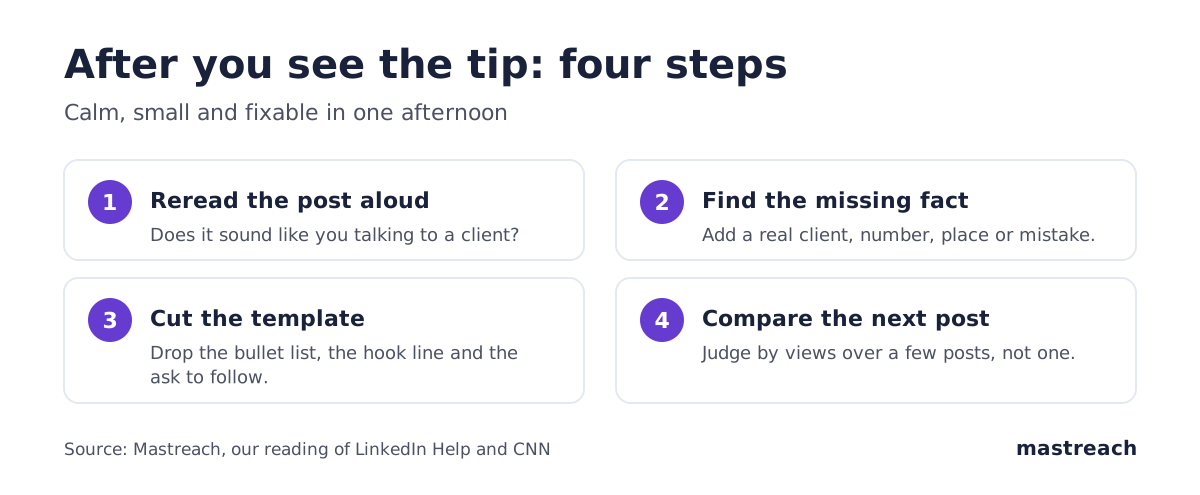
- Read the post aloud. If you would never say it to a client across a table, that is the part to rewrite.
- Add the fact only you have. A client's first question, a number from your own work, a mistake you made. One fact is enough. A post with none can sit under a thousand other names.
- Cut the template. Roth named the perfectly bulleted list and the hook at the top. Try two plain paragraphs instead.
- Judge by several posts. One post tells you little. Look at your next four or five, and compare views.
If you do use AI, keep it to the jobs LinkedIn names: checking grammar, shortening, and clearing up a muddled sentence.
Does it matter for comments too?
Yes, and comments are where most consultants use AI without thinking about it. The button works on comments as well as posts. LinkedIn has also said it acts on comments posted at scale by automation, and on replies that only restate the post. We cover this in our article on AI slop comments and in what LinkedIn's detection means for comments.
Here is some data from one account. Rishav Shankar, who runs Mastreach, looked at 680 of his own comments, all older than 10 days. A typical comment he wrote by hand got 104 views. A typical comment where he edited an AI draft got 101. A typical comment posted exactly as the AI wrote it got 70.
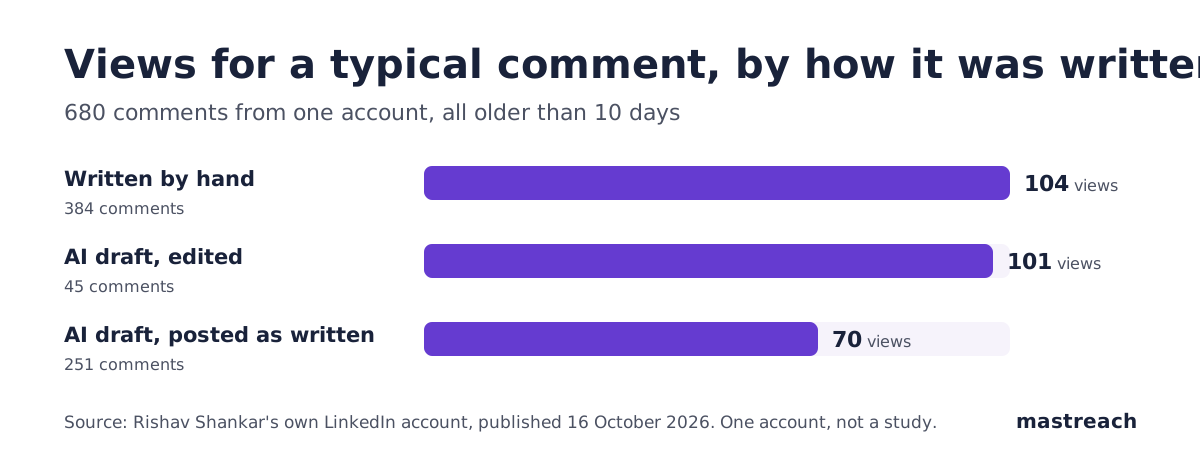
This is one account, over one period, and it is not proof of cause. Our reading is that editing closes almost all of the gap. The draft is a starting point, and the edit is where you go in.
A related habit is worth checking. In that same set, 82 of his comments began with the word "That". An AI draft often has a favourite opening, and a reader sees it too.

If you want to go further, see how to tell if your own comment is slop, and why a verified badge alone will not carry a comment.
Where Mastreach fits
The tip is a reminder that readers can tell when a draft has no person in it. Mastreach is a LinkedIn positioning assistant built around that point.
- It shows posts in your subject that your buyers are reading.
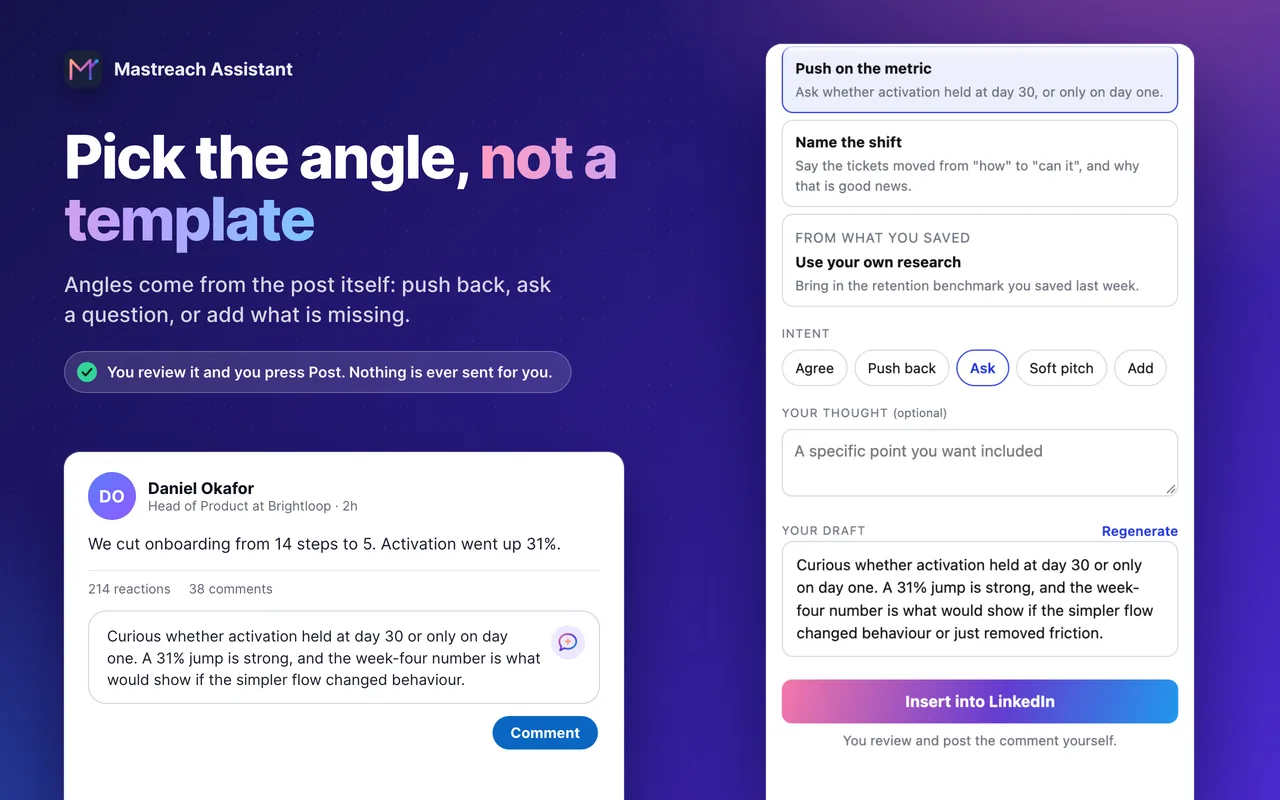
- It offers angles drawn from the post, such as push back, ask, or add what is missing, and drafts a comment in your own voice.
- It saves pages and notes to a knowledge base that later drafts can draw on.
You read, edit and post every comment yourself. Mastreach never posts, comments or messages for you.
There is a 5-day free trial. Plans are from $29 a month at the founding price.
FAQ
Can I remove the "Seems like AI" tip from my post?
LinkedIn has not said that you can dismiss it or appeal it. Its Help page says the tip is only information about how the post is being received. You can edit the post if you want, but we found no statement on what an edit does to the tip.
Does the tip lower my reach on future posts?
LinkedIn has not said so. It has said that content classified as AI slop gets fewer views. We do not know if one tip changes how your later posts are shown, and anyone who says they know is guessing.
Is it still fine to use AI to write LinkedIn posts?
Yes, according to LinkedIn. Its Help page says AI-assisted content is welcome when it reflects a real person's perspective, experience or expertise. It asks you to review, edit and approve everything you post.
Do I have to tell people I used AI?
LinkedIn recommends that you say so if you relied heavily on AI and it is not obvious from context. This is a recommendation in its Help page, not a rule we found stated as a requirement.
Sources
See what your own comments are reaching.
Mastreach finds the LinkedIn posts your buyers are reading, drafts a comment in your voice, and counts the impressions LinkedIn never adds up for you. You post every comment yourself.
- 914 comments drafted with Mastreach and posted by their owners
- 177,931 LinkedIn impressions on those comments, August to September 2026