LinkedIn Verified Comments Filter: Should You Verify?
LinkedIn lets readers filter comments to verified members. What is confirmed, what is not, and how to write comments that earn attention.
Part of our LinkedIn comments guide: where to comment, what to write, and how to measure what it earns.
LinkedIn now lets readers sort the comments under a post to show only verified members. Verifying your profile is free, so yes, it is worth doing, but it is not enough on its own.
The badge says you are a real person. It does not say you have something useful to add. That part is still up to the comment.
What is the Verified Members comment filter on LinkedIn?
It is a new way to sort comments. LinkedIn's help text, quoted by Social Media Today, says some members "may see a new comment sort option called Verified Members". It sits beside Most Relevant and Most Recent. Choose it and you see comments only from members with verified profiles.
LinkedIn gives its reason in the same text: to "reduce the noise from automated, generic, or inauthentic comments". On 4 June 2026 it repeated the point in a post on LinkedIn News. It says members can now filter for its "100M+ verified members" in comments and conversations in the feed.
Two details matter. The word "some" means not every reader has it yet. And the filter is something the reader chooses. Your comment is not hidden from everyone else.

Does being verified make your comments reach more people?
LinkedIn has not said so. We found no statement that a badge raises the ranking or the reach of a comment.
What LinkedIn does say is about profiles. Its Get verified help page says verified members see "60% more profile views and 50% more engagement on average". That is LinkedIn's own figure for profiles and general engagement, not for comments, and it does not say how the figure was measured. Verified members may simply be more active.
We have no data on this either. Across the 914 comments drafted in Mastreach and then posted (August to September 2026), LinkedIn showed 177,931 impressions, about 195 per comment. We did not record which accounts were verified, so we cannot compare. Impressions are also not unique people, because repeat views and your own views count.
So treat the filter this way. If a reader uses it, an unverified comment is not in their view at all. That is a reason to verify. It is not a promise of more reach.
How do you verify your LinkedIn profile, and does it cost anything?
It costs nothing. LinkedIn says verification "is available with no additional cost" and is optional. You can remove it at any time.
The help page lists three kinds: identity, workplace and education. What is on offer depends on your country:
- US, Canada and Mexico: identity checks go through CLEAR, with a government ID.
- India: identity checks use DigiLocker credentials.
- Many other countries: identity checks go through Persona and need a valid passport with an NFC chip.
- Workplace and education: these can be options where identity checks are not.
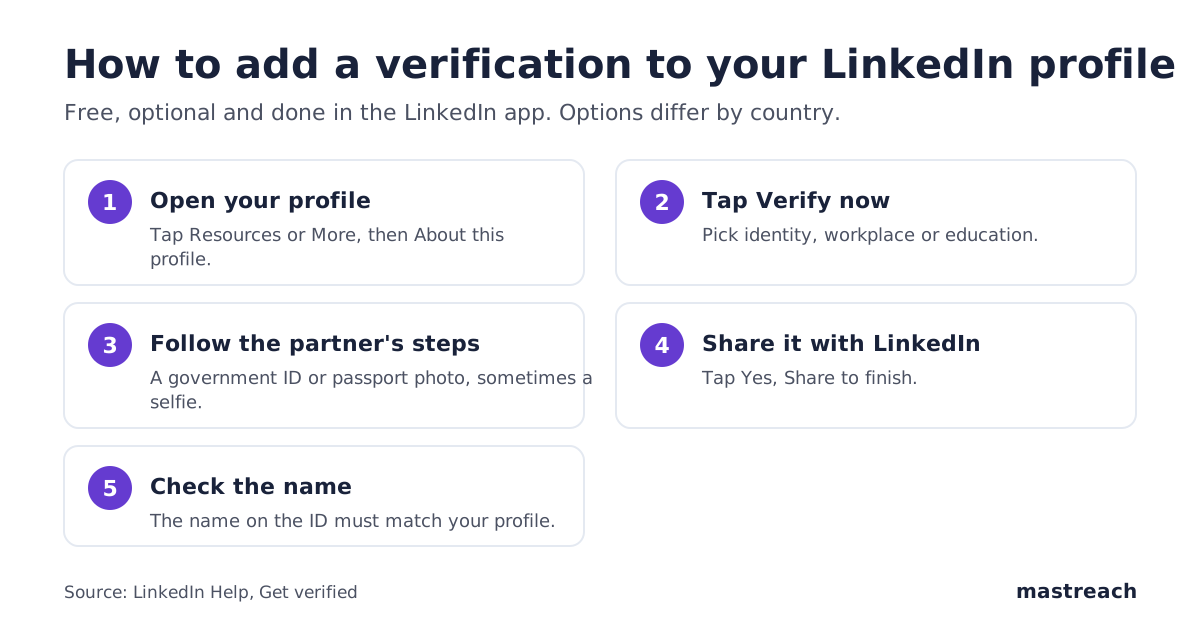
A few practical points from LinkedIn's help pages. Do it in the mobile app. The name on your ID must match the name on your profile. LinkedIn may show the country that issued your ID on your profile.
A consultant in Manchester, a founder in Pune and an agency owner in Dubai will each see a different path. If your profile shows no identity option, check the workplace option.
What does LinkedIn say about automated and generic comments?
This is the part that matters more than the badge. In the same June post, LinkedIn says its new systems will "recognize and take action" on two kinds of comments:
- Comments posted at scale with automation tools, "with little or no human involvement"
- "Responses that simply restate the original post without sharing anything new"
LinkedIn also says it is fine to use AI to help you write, but "your posts and comments need to represent your voice and your perspectives."
LinkedIn does not say how a comment is scored or what the action is. Its post speaks of content being "less likely to be widely distributed beyond a person's immediate network". Apply that carefully. It is about generic content, and we have not seen LinkedIn describe the exact limit for comments. For more on this, see our piece on AI slop detection and comments.
Is a verified badge enough, or must the comment still add something?
The comment must add something. A verified account that writes "Great insights, thanks for sharing" is a real person writing a generic comment. It passes the filter and then says nothing.
Our reading is that LinkedIn is building two layers. The badge answers "is this a person?". The words answer "is this worth reading?". Only the second layer helps a buyer decide you know your field.
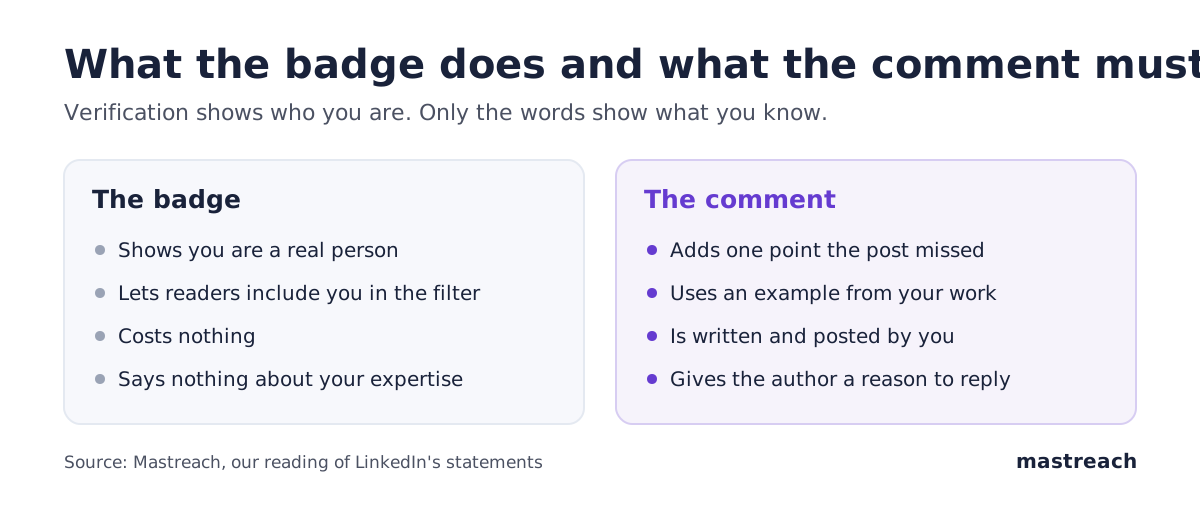
Here is the difference on a post about late client payments.
| Verified, but generic | Verified and specific |
|---|---|
| "So true. Cash flow is key." | "We moved to 50% upfront for new clients in 2024. Late payments fell, and the clients who left were the ones paying late anyway. Do you ask for a deposit?" |
The second one restates nothing. It gives one fact from the writer's own work and asks one question.
How can a consultant use this on buyers' posts?
You do not need a new method. Add one step to what already works.
- Verify once. It takes a few minutes in the app. Choose the option your country offers.
- Pick posts your buyers actually read. Not the biggest posts, the ones your clients' peers comment on. Our guide to which LinkedIn posts to comment on shows how.
- Write three to five sentences. Add a point the post missed, from a real client, number or mistake.
- Ask one question. It gives the author a reason to reply.
- Post it yourself, by hand. Do not use tools that post for you. LinkedIn says it acts on exactly that.
- Keep the best comments in mind for pins. Authors can now pin helpful comments, as we explain in LinkedIn pinned comments.

Do this on a few posts a day, and in a month you will have a record of work buyers can see under their own peers' names. That is slower than any trick, and it is the one that survives LinkedIn's changes.
Where Mastreach fits
Verifying fixes the "is this a real person" question. Writing a good comment on the right post, every day, is the harder habit. Mastreach is built for that.
- It shows the LinkedIn posts in your subject that your buyers are reading.
- On any post, you pick an angle (push back, ask, add what is missing) and get a draft in your own voice, which you rewrite with your own fact.
- It records the impressions LinkedIn shows under each comment and adds them up.
You read, edit and post every comment yourself. Mastreach never posts or comments for you.
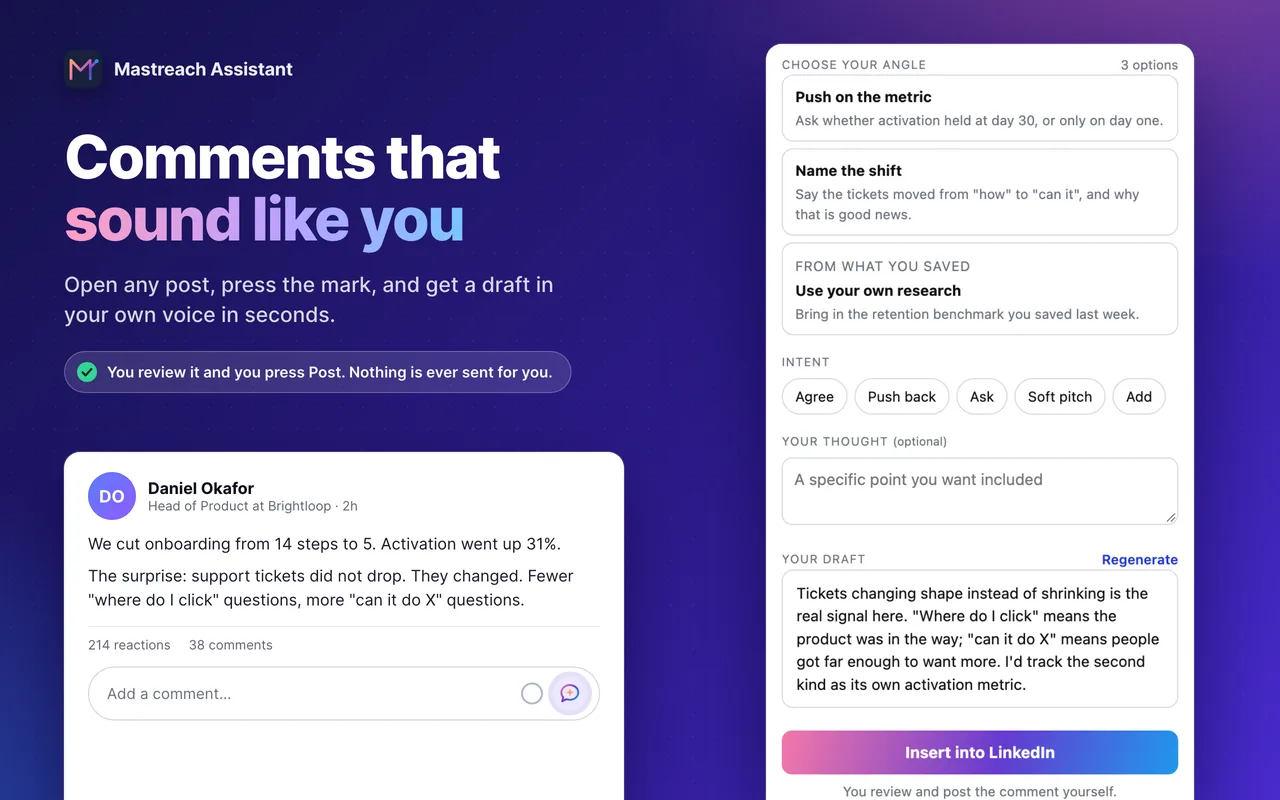
You can try it free for 5 days. A card is required, and nothing is charged during the trial.
FAQ
Do I need to be verified to comment on LinkedIn?
No. Anyone can comment. Verification only matters if a reader chooses the Verified Members sort, in which case unverified comments are not shown in that view.
Does LinkedIn rank verified comments higher?
LinkedIn has not said so. It has said verified members see more profile views and engagement on average, but that is not a statement about comment ranking.
Is LinkedIn verification free?
Yes. LinkedIn's help page says verification is available at no additional cost and is optional. Identity checks use partners such as CLEAR, Persona or DigiLocker depending on your country.
Can I use AI to write my LinkedIn comments?
LinkedIn says it is fine to use AI to help you write, as long as the comment represents your voice and your perspective. It says it acts on comments posted at scale by automation tools with little or no human involvement.
Sources
See what your own comments are reaching.
Mastreach finds the LinkedIn posts your buyers are reading, drafts a comment in your voice, and counts the impressions LinkedIn never adds up for you. You post every comment yourself.
- 914 comments drafted with Mastreach and posted by their owners
- 177,931 LinkedIn impressions on those comments, August to September 2026