LinkedIn pinned comments are back: write one worth pinning
Post authors can pin one comment to the top of the thread again. Who can pin, why a pinned comment matters, and what makes a comment worth pinning.

Part of our LinkedIn comments guide: where to comment, what to write, and how to measure what it earns.
LinkedIn has brought back pinned comments. Post authors can now pin a helpful comment, so it stays at the top of the discussion under their post.
For a consultant, the lesson is simple. A comment that adds something specific can now be fixed in front of another person's whole audience. A comment that says "Great post" cannot.
What did LinkedIn announce about pinned comments?
On 15 October 2026 LinkedIn announced a set of creator updates. One line covers comments. Social Media Today quotes LinkedIn: "Authors can now pin helpful comments".
That report adds that pinning is a return. LinkedIn rolled it out to some users in 2022, then shelved it soon after.
We have not found a LinkedIn help page for the new version yet. So the details are open: who has it today, whether there is a limit on pins, and whether a pinned comment is marked as such. Treat anything more specific as unconfirmed until LinkedIn publishes it.
Who can pin a comment?
The author of the post. You can pin a comment under your own post. You cannot pin a comment under someone else's.
Whether every account has the feature yet is not stated in the sources we read. If you do not see a pin option in the menu on a comment under your post, it has probably not reached you. Check again in a week.
Why does a pinned comment matter for a consultant?
Think of a busy post from a respected person in your field. Hundreds of people read it. Most read only the first few comments.
Before pinning, the top spot went to whatever LinkedIn's ranking chose. With pinning, the author chooses. And authors choose comments that make their post look good: a clear extra point, a useful example, a good question.
That is a quiet opportunity. A founder in Austin, a consultant in Manchester and a firm in Dubai all face the same thing. The comment that earns a pin gets read by the author's audience, which is often your buyers.
Our reading: pins make careful comments more valuable and quick comments less so. We have no data on pinned comments yet, so this is a reasoned view, not a measured result.
How much reach does a comment earn before any pin?
Not much on its own, but it adds up. Across the comments drafted in Mastreach and then posted by users (914 comments, August to September 2026), LinkedIn showed 177,931 impressions, about 195 per comment. That is an average, and many comments earned far less.
Two caveats matter. Impressions are not unique people, because repeat views and your own views count. And we have no comparison with what those accounts earned before. A pin would sit on top of that baseline. We do not know how large the lift would be.
What makes a comment worth pinning?
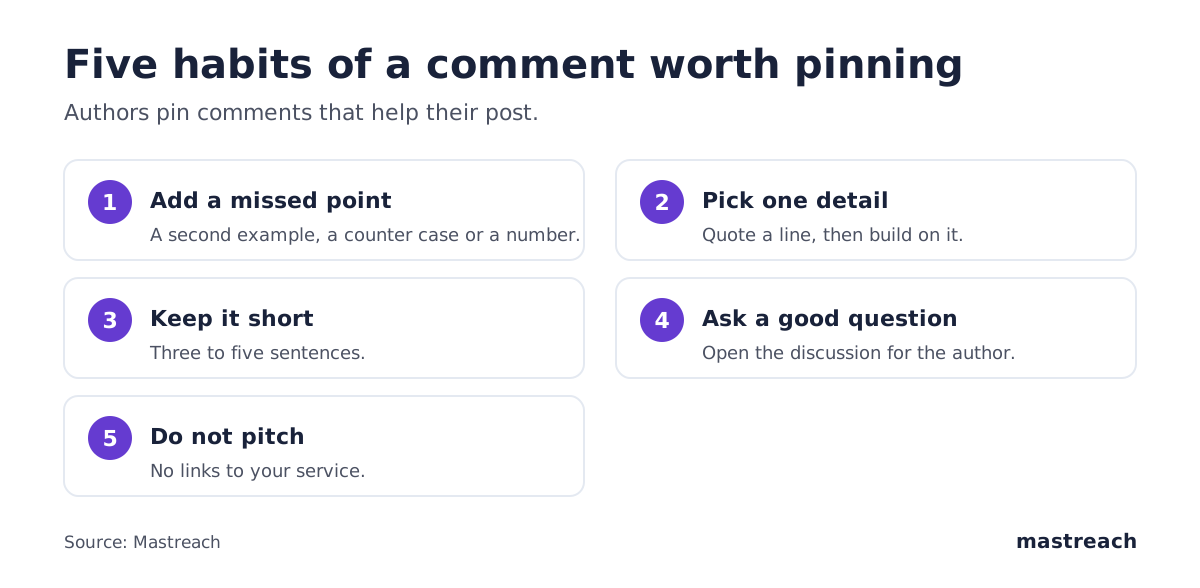
An author pins a comment because it helps the post. These habits make that more likely:
- Add a point the post missed. A second example, a counter case, a number from your own work.
- Be specific to one detail. Quote a line from the post, then build on it.
- Keep it short. Three to five sentences. Authors rarely pin an essay.
- Ask a good question. A question that opens the discussion helps the author more than praise does.
- Do not pitch. A comment with a link to your service will not be pinned, and it can hurt your name.
Here is a weak and a strong version for a post about late client payments.
| Weak | Strong |
|---|---|
| "So true! Thanks for sharing." | "We moved to 50% upfront for new clients last year. Late payments dropped, and the hard conversations happened before the work, not after. What do you do with long-standing clients?" |
The strong one gives the author something to answer, which keeps their thread alive. That is why it gets pinned.
Which posts are worth your effort?
Do not chase every post. Pick posts by people your buyers actually read, and put your best comment there. Our guide on which LinkedIn posts to comment on gives a simple method for building that list.
Pace matters too. A few considered comments a day beat a rush of short ones. LinkedIn has said it may limit how many comments you make in a period, as we explain in how many comments per day is too many.

Should you pin comments on your own posts?
Yes, with care. When you pin a reader's comment, you give that person a visible thank-you, and you guide the thread.
Good candidates:
- A reader's question that many others share, with your answer under it.
- A comment that adds an example your post did not have.
- A comment from a likely client, if it is helpful on its own merits.
Avoid pinning only flattery. Readers notice, and it makes your thread look staged.
Also reply to the people who comment. LinkedIn now orders comments by relevance to each reader, as we covered in LinkedIn comment ranking. A pin is one more reason to keep conversations real.
What else did LinkedIn announce for founders and consultants?
Two other changes are worth a look, though neither is about comments.
Advice Sessions. Engadget reports that business owners can offer paid one-to-one sessions through LinkedIn, starting with Premium Business subscribers in the US, and that LinkedIn takes no cut. LinkedIn's help page says hosting is limited to invited US subscribers, with a price of up to $500 and payments through Stripe. Stripe charges its own fee. If you are outside the US, this is not open to you yet. LinkedIn has said wider access is coming, with no date.
A profile insights dashboard. LinkedIn says it will show how content performs. Details were thin at launch.
What should you do this week?
- Look for the pin option on a comment under one of your own posts.
- Choose three people your buyers read. Write one considered comment on each of their next posts.
- Pin the best reader comment under your own latest post, and reply to it.
- Track your results by impressions per comment, not by count of comments.
Where Mastreach fits
Pins reward comments that add a real point to the right post. That takes time to find and to write well.
Mastreach helps in three ways:
- It shows LinkedIn posts in your subject that your buyers are reading.
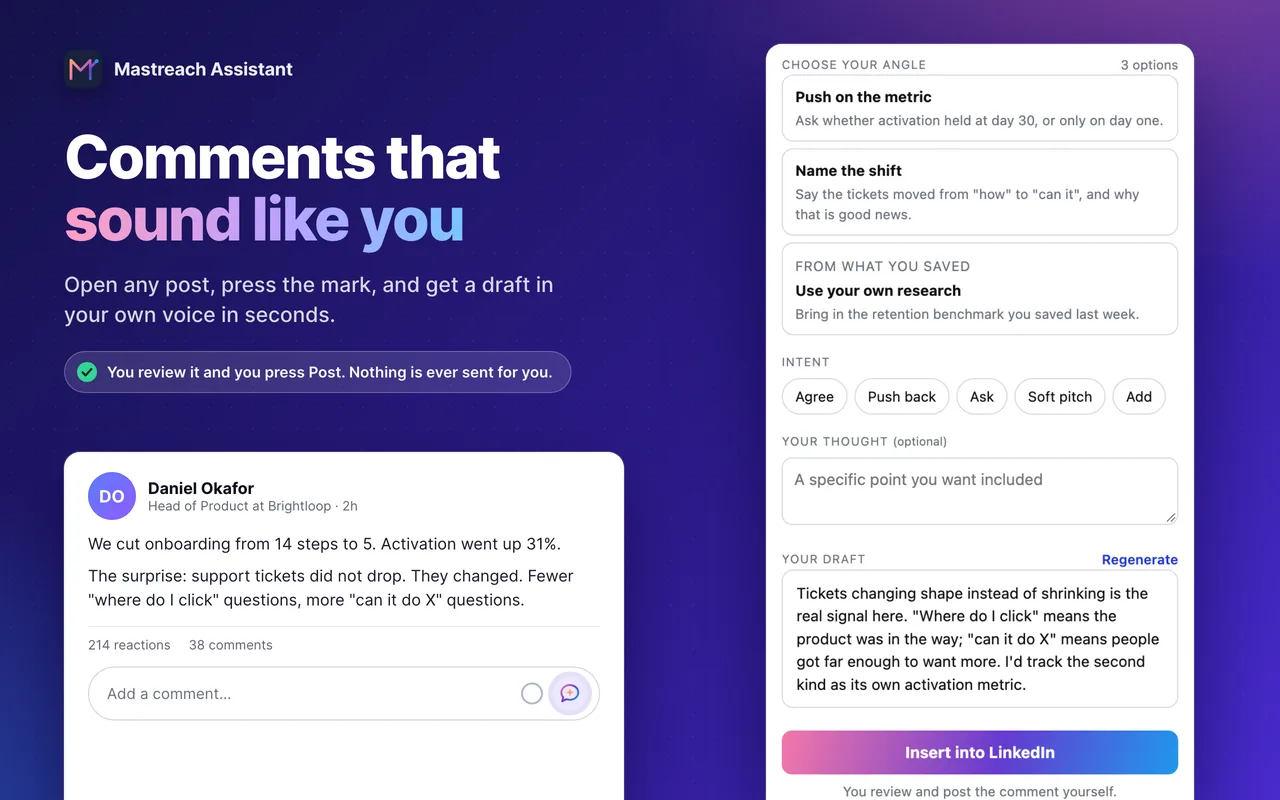
- It drafts a comment in your own voice, from an angle drawn from the post.
- It records the impressions LinkedIn shows under each comment and adds them up.
You edit and post every comment yourself. Mastreach never posts, comments or messages for you.
Try it free for 5 days. A card is required, and nothing is charged during the trial.
FAQ
Can I pin a comment on someone else's LinkedIn post?
No. Only the author of the post can pin a comment under it, according to LinkedIn's announcement that "authors can now pin helpful comments".
Is the pinned comments feature available to everyone yet?
We could not confirm this. LinkedIn announced it on 15 October 2026, but we found no help page on rollout or limits. If you do not see a pin option, check again later.
Will a pinned comment bring more clients?
There is no data on this yet. A pin puts a comment at the top of an author's thread, where more readers see it. Whether that leads to clients depends on whether the comment is useful and the audience matches your buyers.
Are Advice Sessions open to consultants outside the US?
Not yet. LinkedIn's help page says hosting is limited to invited US Premium Business subscribers, and bookers must be in the US too.
Sources
- LinkedIn adds new creator monetization options (Social Media Today, 15 Oct 2026)
- LinkedIn Is Adding New Tools To Help People With Their Side Hustles (Engadget, 15 Oct 2026)
- Advice sessions for Premium subscribers (LinkedIn Help)
- Mastreach data: 914 comments drafted in Mastreach and posted, August to September 2026
See what your own comments are reaching.
Mastreach finds the LinkedIn posts your buyers are reading, drafts a comment in your voice, and counts the impressions LinkedIn never adds up for you. You post every comment yourself.
- 914 comments drafted with Mastreach and posted by their owners
- 177,931 LinkedIn impressions on those comments, August to September 2026