LinkedIn collaborative posts: co-author with a client?
How LinkedIn collaborative posts work, how to check if you have the button, and how a consultant can co-author a case study with a client.

A LinkedIn collaborative post is one public post that appears on your profile and on the profiles of up to five people or Company Pages you invite. For a consultant, coach or founder, the most useful way to use it is to co-author a short case study with a client who is happy to be named.
Our reading is that this is a trust tool more than a reach trick. A client putting their own name on your results says more than you saying it yourself. This article explains how the feature works, how to check whether you have it, and how to ask a client in a way they can easily say yes to.
What is a LinkedIn collaborative post?
It is a single post with several names on it. LinkedIn announced the feature on 23 July 2026 as a new post format that lets you post jointly with up to five other members or Company Pages.
You start it in the post box by clicking "add collaborators". Each person you invite gets a notification and chooses whether to be listed. If they accept, the post appears on their profile too.
LinkedIn says most formats work: text, images, video, documents, polls and events. For a consultant, a short text post with one image or a document is the simplest choice.
Do you have the "Add collaborators" button yet?
Maybe not, and LinkedIn's own pages do not agree. The July announcement says the feature is available globally. The LinkedIn Help page says it is rolling out gradually and that only members in the early access program can create collaborative posts.
We cannot tell you which is true for your account. Check it yourself:
- Open the post box on a laptop, not only the phone app.
- Look for "add collaborators" below your text.
- If you cannot see it, check again in a few weeks. Do not pay anyone who promises to unlock it.
Even if you have the button, the person you invite may not. The Help page says the ability to collaborate with a member depends on their collaboration settings. So ask your client first, before you write anything.

Is a collaborative post a reach hack or a trust signal?
A little of both, but we would plan for trust.
The B2B Content Show, a trade publication, argues that engagement on a collab post is pooled into one object that several networks feed. That is one writer's view. LinkedIn has not confirmed that these posts get extra reach, so treat it as unproven.
The same article makes a point we think is true and useful: you cannot cleanly say whose network produced which like or comment. So a collaborative post with 40 reactions does not prove it beat your solo posts.
For a consultant who sells high-value work, reach matters less than who reads the post. A client's name on it tells their peers, who look like your next clients, that you delivered. That is why we would use it for proof, not volume.
Who should a consultant co-author with?
Three kinds of people work well. In order of value:
- A client with a result. A US agency owner whose lead flow doubled, or a UK finance director who closed the books faster. They have a real story and their name carries weight with their peers.
- A referral partner. A tax adviser in Dubai and a business coach in Mumbai who share clients can post one joint note on how they work together.
- A peer for a joint event or report. Two firms announcing a webinar share the audience without either one repeating the other's post.
Avoid inviting people only to borrow their audience. If the post is not truly shared work, readers can tell, and a collaborator who feels used can remove themselves at any time.
How do you ask a client to be a collaborator?
Make the request small, specific and easy to refuse. A busy owner is more likely to say yes to a draft than to a blank page.
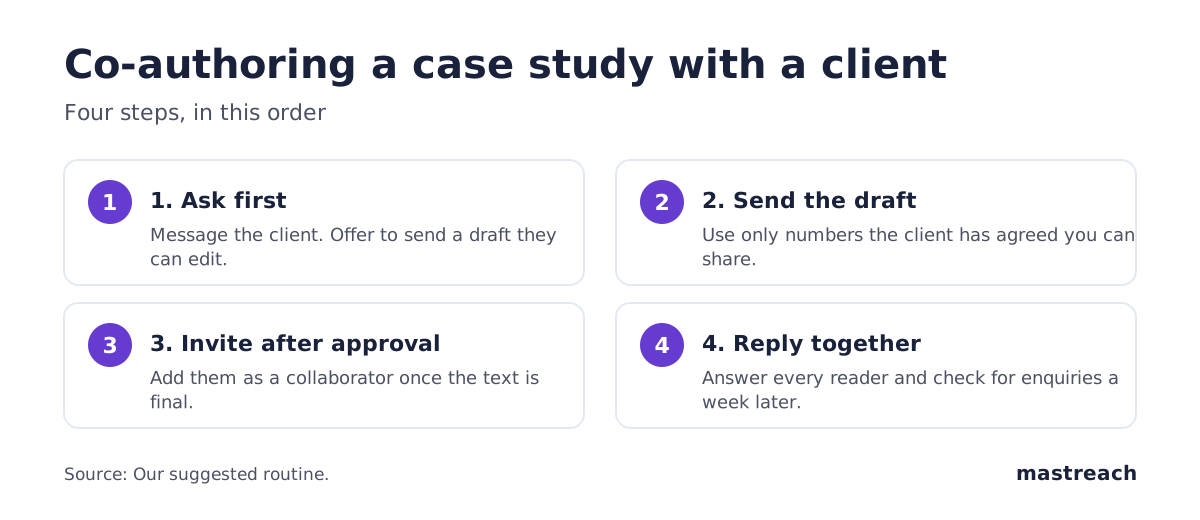
Here is a message you can adapt:
"Hi Maria, I would like to write a short note about the work we did on your onboarding. I will send you the draft first, and you decide what is said and whether your name goes on it. If you like it, I can add you as a collaborator so it appears on your profile too. Would that be alright?"
Then follow these steps:
- Ask by message or call, not through LinkedIn's invite. The invite arrives as a notification and is easy to miss or ignore.
- Send the draft with real numbers. Use only figures the client has agreed you can share. Two or three plain facts beat ten adjectives.
- Let them edit freely. Their name is going on it.
- Invite them only after they approve the text. Then the notification is a formality, not a surprise.
- Thank them in the first comment, and reply to every reader. Replies from both of you keep the post alive.
What can and cannot a collaborator control?
LinkedIn's Help page is clear about this:
| Who | What they can do |
|---|---|
| The person who creates the post | Edit the post and manage collaborators |
| A collaborator | Accept or decline, and remove themselves at any time |
| A collaborator who accepted | See engagement figures such as reactions, comments and shares |
| A Page added as a collaborator | Appear on the post, but its admins see performance only in Page analytics |
Two more rules matter. The post must be public. And the person who created it is responsible for following LinkedIn's content policies. If you are the writer, you carry that responsibility, so check every claim and number before you publish.
How do you tell if it worked?
Do not judge by reactions alone. With several networks feeding one count, a bigger number is expected and proves little.
Ask three plainer questions a week later:
- Did anyone from the client's world reply or message you? Look for people you did not know before.
- Did the post lead to a conversation about a project? One enquiry is worth more than 500 reactions.
- Did the client use it? If they share it with their own team or prospects, it has done its job.
Write the answers in your notes. Compare with your last two solo posts, and keep in mind that three posts is a small sample.
Comments tell you more than counts, and you can measure those. In our own data from August to September 2026, 914 comments drafted in Mastreach and then posted earned 177,931 impressions, about 195 per comment. These are impressions as LinkedIn reports them, not unique people, and we have no before-and-after comparison for those accounts. Still, they show that thoughtful comments under other people's posts are a second way to be seen by the same buyers. If you are building your list for this, see our guide to an engagement list of 30 buyers.
What should you do before you ask anyone?
Warm the relationship first. A client who has seen you comment thoughtfully on their posts is far more likely to agree. We covered why in why to comment before you connect, and the same logic holds here. If your following is small, our piece on getting clients with a small following shows a four-week routine that makes the ask feel natural.
Where Mastreach fits
A collaborative post only works when the right people see it and the conversation underneath it is good. Mastreach is a LinkedIn assistant that helps with both.
- It shows the posts your buyers are reading, so you know whose comment sections to join before you ask for anything.
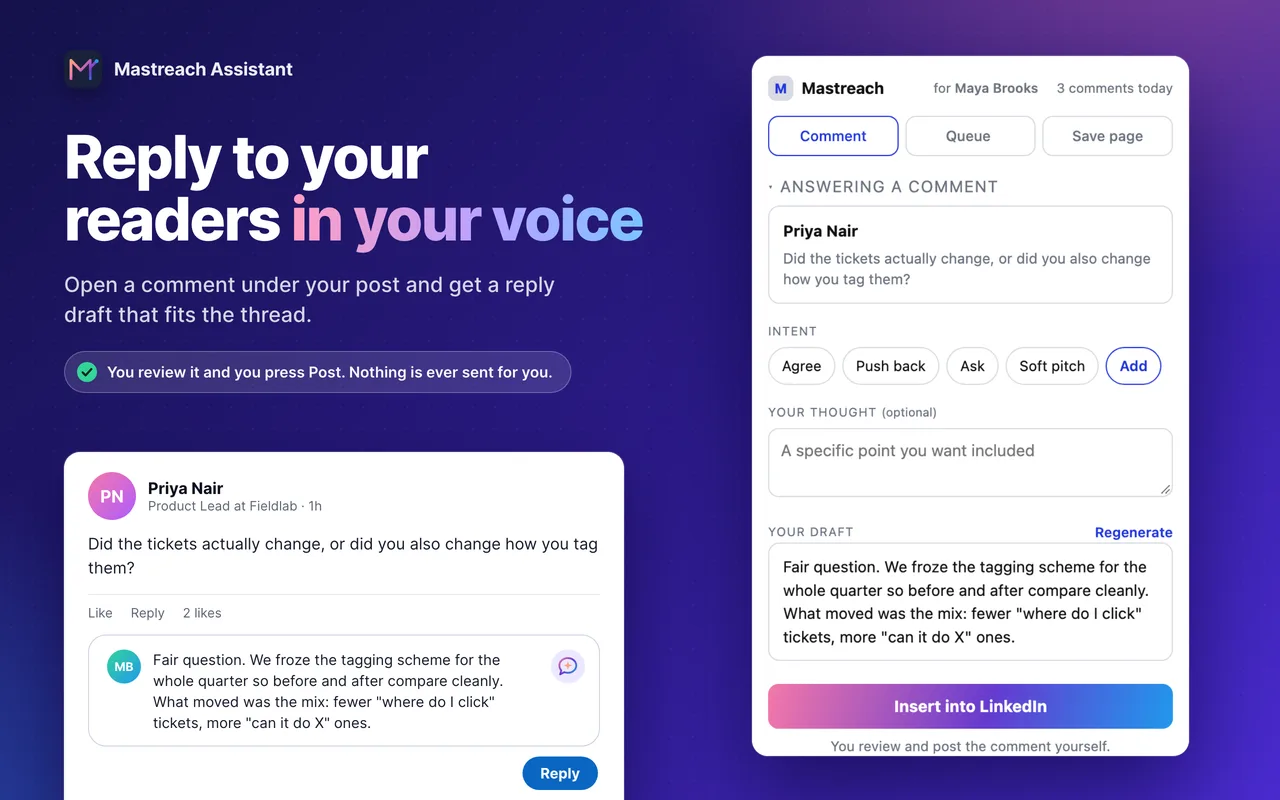
- It drafts replies to the readers who comment under your posts, in your own voice, so a joint post gets answered quickly.
- It adds up the impressions LinkedIn shows under each of your comments.
You read, edit and post every comment yourself. Mastreach never posts, comments or messages for you. The 5-day free trial needs a card but charges nothing during the trial.
FAQ
How many people can I add to a LinkedIn collaborative post?
You can add up to five collaborators, so up to six names in total including yours. They can be members or Company Pages. Each has to accept the invitation.
Can I make a collaborative post private or edit it later?
No to private: LinkedIn's Help page says collaborative posts must be public. Only the person who created the post can edit it or manage collaborators.
Can a collaborator remove themselves?
Yes. LinkedIn says collaborators can remove themselves from the post at any time. That is another reason to agree the wording with them before you publish.
Will a collaborative post get me more reach?
LinkedIn has not said so. One trade article argues that pooled engagement concentrates momentum, but that is not confirmed by LinkedIn. Treat extra reach as a possible bonus, not a reason to use it.
Sources
See what your own comments are reaching.
Mastreach finds the LinkedIn posts your buyers are reading, drafts a comment in your voice, and counts the impressions LinkedIn never adds up for you. You post every comment yourself.
- 914 comments drafted with Mastreach and posted by their owners
- 177,931 LinkedIn impressions on those comments, August to September 2026