LinkedIn Network tab vs For You tab: what each one shows
Network shows people you follow or are connected to. For You shows practitioners beyond your network. What the 2026 test means for your reach.

What are the LinkedIn Network and For You tabs? They are two views at the top of the feed that LinkedIn began testing in September 2026. Network shows people you have connected with or followed, and For You is meant to bring in practitioners from inside and outside your network. LinkedIn calls it a test, so nothing here is final.
If you are a founder, coach or consultant, the sensible response is calm. Below is what LinkedIn has actually said, what it has not said, and a short plan you can follow this month.
What exactly has LinkedIn announced?
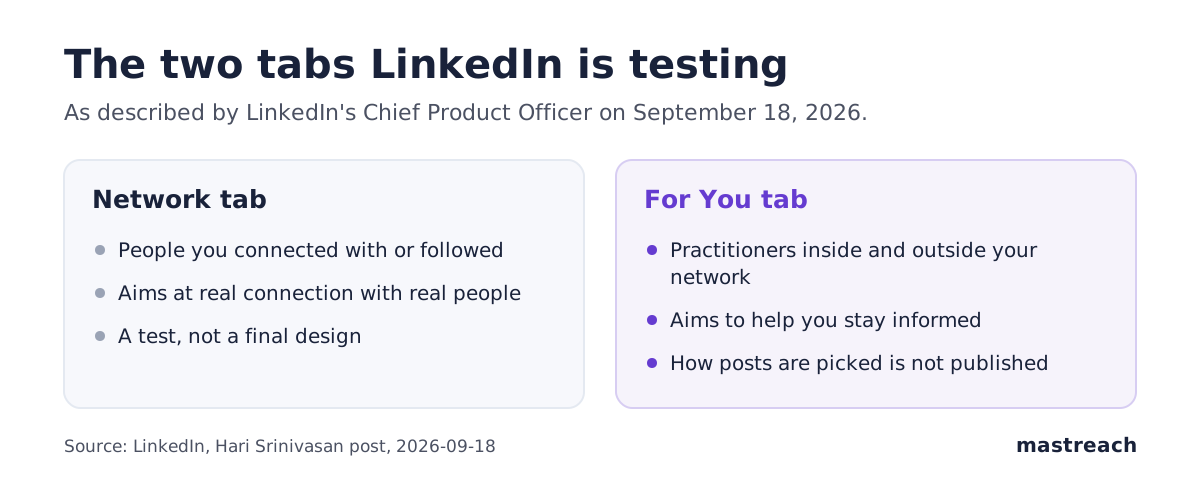
On September 18, 2026, Hari Srinivasan, LinkedIn's Chief Product Officer, posted on LinkedIn that the company is "testing a new design on the top of the feed". He described two tabs.
- Network helps you stay connected to the people you have explicitly connected with or followed.
- For You helps you stay informed, with posts from "real practitioners" inside and outside your network.
He added that there is "more to come". Social Media Today reported the same announcement on September 20.
Is this permanent, and who can see it?
Not as far as we know. LinkedIn describes it as a test. Social Media Today notes that LinkedIn ran other alternative feed tests last year and in June 2026, and that neither has had a wider launch. It judged the chances of this one catching on to be slim.
One smaller outlet, Parasocial Magazine, reports that the first wave is limited to users in the United States. LinkedIn's own post does not say this, so treat it as unconfirmed. The same article says LinkedIn has not shared the size of the test, how long it will run, or when it might spread.
So you may see the tabs, or you may not. A US agency owner might have them today while a consultant in London or a founder in Dubai does not.
What has LinkedIn not told us?
Quite a lot. LinkedIn has not published:
- how posts are chosen for the For You tab;
- whether comments help a person appear there;
- how many people are in the test;
- whether the split will be rolled out to everyone.
Anyone who tells you the exact rules is guessing. That includes us. When we go beyond LinkedIn's words below, we say "our reading".
Does the For You tab help new founders get found?
It might. Our reading is that a tab built partly around people outside your network is a chance for a stranger to meet your work. The Network tab, by LinkedIn's description, favours people who already know you.
Parasocial Magazine makes a similar point: for anyone building an audience, the For You tab decides how fast a new one arrives. That is the writer's opinion, not LinkedIn's statement.
The practical meaning is simple. If a stranger lands on something you wrote, they have a few seconds to decide whether you know your subject. Clear is better than clever.
How do comments reach people outside your network?
LinkedIn has not said that comments feed the For You tab, so we will not claim it. What we can say is how comments already travel.
When you comment on a post, your name and words are shown to the people reading that post. Many of them are not in your network. They are the author's audience, and often your buyers.
Here is what we see in our own data. From August to September 2026, 914 comments drafted in Mastreach and then posted earned 177,931 impressions, about 195 per comment. Impressions are not unique people, since repeat views and your own views count. We also have no comparison with the same accounts before they started, so this shows reach, not cause.
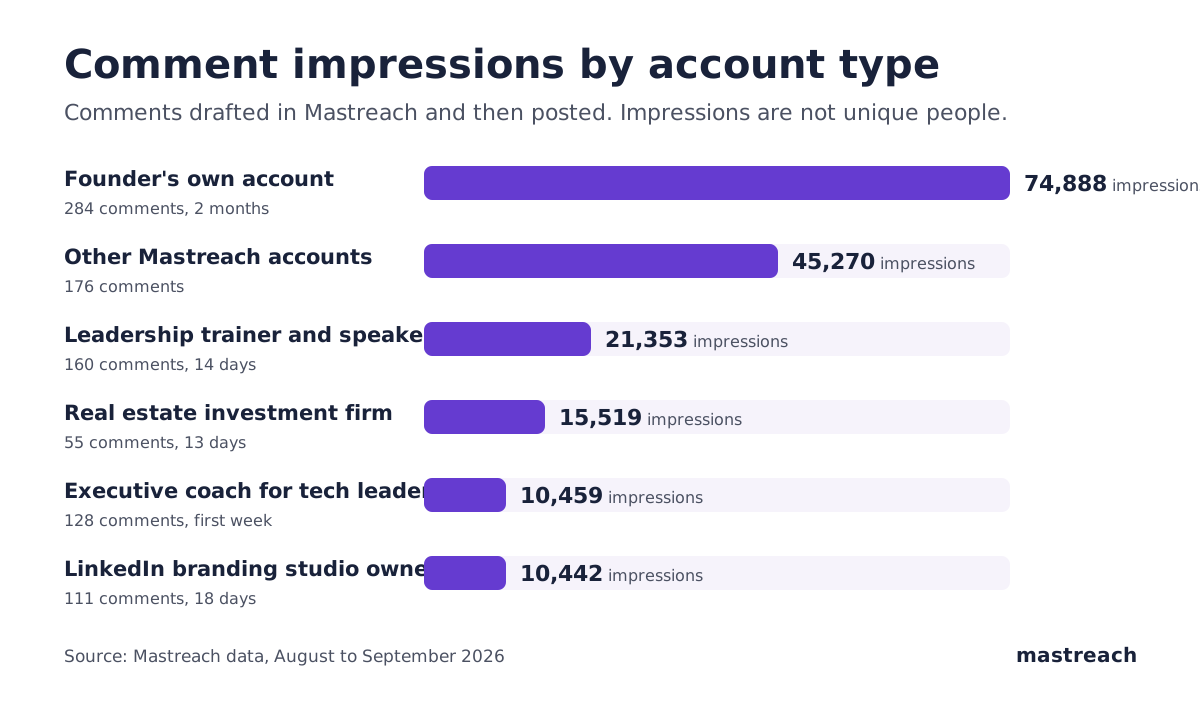
Our reading: comments put you in front of strangers who are already interested in your subject. That does not depend on any one tab. If you want the full picture, see what 914 comments earned.
What should a founder or consultant do this month?
Do not rebuild your plan around a test. Do three small things.
- Keep going where your buyers read. Pick five to ten people whose posts your buyers follow. Comment on their posts a few times a week. If you are unsure which subject to lead with, read why your reach may be low.
- Make your expertise obvious in ten seconds. Your headline should say who you help and with what, in plain words. Your latest comments should back it up.
- Say one real thing in each comment. Add a short example from your own work. A comment that only repeats the post gives a stranger nothing to remember.
A founder in Mumbai, a coach in Manchester and an agency owner in Austin can all do this in about 20 minutes a day. None of it needs the new tabs.

How do you measure reach when the feed is split?
You cannot see which tab a view came from, as far as we know. So measure what you control.
- Note how many comments you posted each week.
- Open each comment and write down its impressions. LinkedIn shows these one comment at a time. Here is where to find them.
- Track profile visits and new connection requests from people in your target market.
- Count real conversations, not likes.
Mastreach adds the comment impressions into one total, because LinkedIn shows them nowhere. A notebook works too. Keep the same method for a month and compare.
Where Mastreach fits
With the feed split and its rules unpublished, the safest habit is the one that works in either tab: useful comments under posts your buyers read, and a way to see whether they are being read. Mastreach covers both.
- Where to comment: it shows you posts in your subject that your buyers are reading, including from people you do not follow.
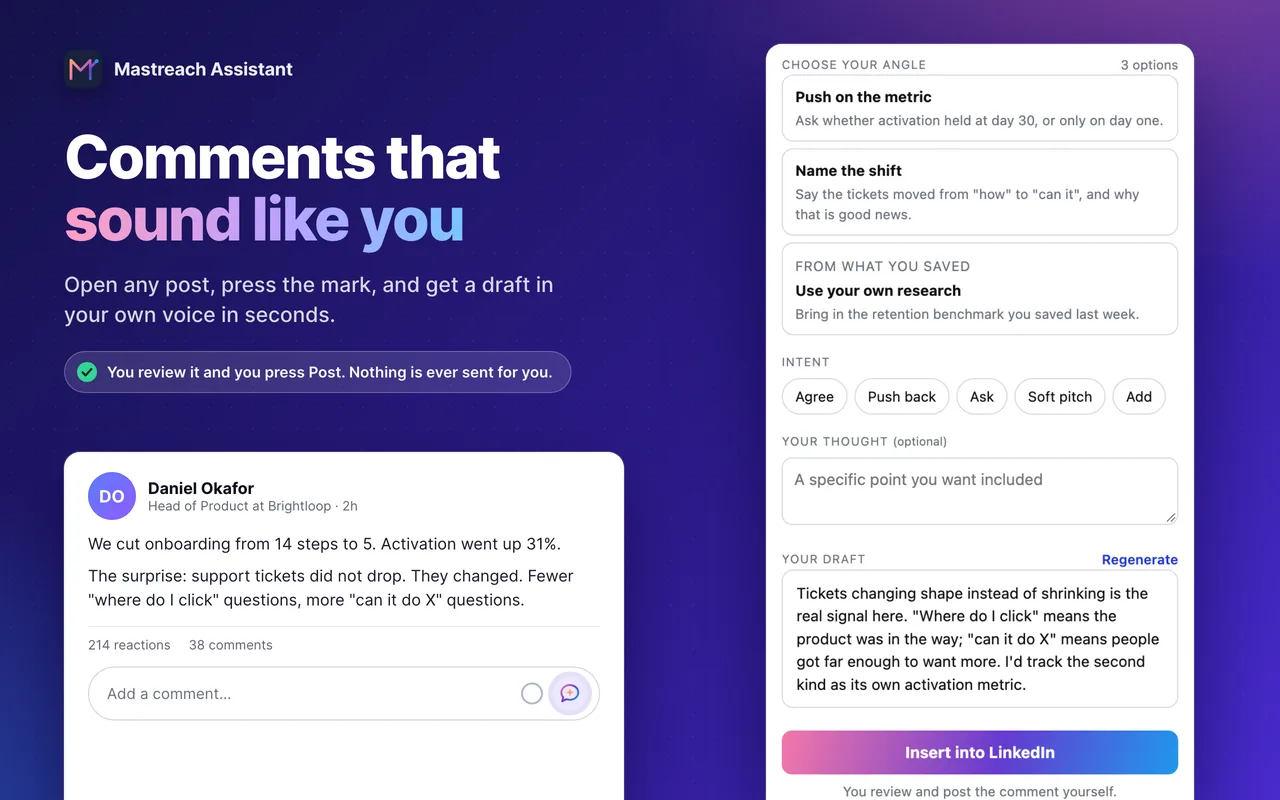
- What to say: pick an angle and get a draft in your own voice. You edit and post it yourself.
- What it reached: it adds up your comment impressions every week, so you can compare before and after the tabs reach you.
You can try it free for 5 days.
FAQ
What is the LinkedIn For You tab?
It is one of two tabs LinkedIn is testing at the top of the feed. LinkedIn says it helps you stay informed with posts from practitioners inside and outside your network. It is a test, and LinkedIn has not published how it chooses posts.
Do I have the LinkedIn Network tab yet?
You may not. LinkedIn is testing the design, and one outlet reports that the first wave is in the US. LinkedIn itself has not confirmed where it is available. If you do not see it, you are not missing anything yet.
Will the split feed reduce my reach?
Nobody outside LinkedIn knows. It is a small test, and earlier feed tests did not roll out widely. Our reading is that posting useful things and commenting where your buyers read is a safe approach either way.
Should I change how I post because of the new tabs?
Not yet. Wait until LinkedIn publishes rules or the tabs reach everyone. Until then, make your profile clear to strangers and keep adding real comments.
Sources
- Hari Srinivasan, LinkedIn Chief Product Officer: We're testing a new design on the top of the feed (LinkedIn, September 18, 2026)
- LinkedIn tests Network tab to encourage engagement among connections (Social Media Today, September 20, 2026)
- LinkedIn Splits U.S. Feed Into For You and Network Tabs (Parasocial Magazine, September 30, 2026)
- Mastreach data, August to September 2026: comments drafted in Mastreach and then posted, impressions as LinkedIn reports them.
See what your own comments are reaching.
Mastreach finds the LinkedIn posts your buyers are reading, drafts a comment in your voice, and counts the impressions LinkedIn never adds up for you. You post every comment yourself.
- 914 comments drafted with Mastreach and posted by their owners
- 177,931 LinkedIn impressions on those comments, August to September 2026